Photoreal Character Design Sheet
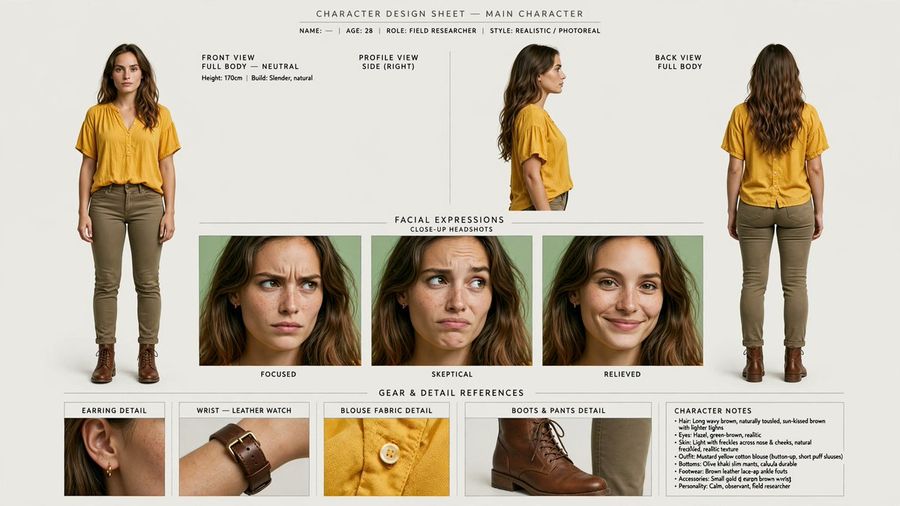
Creates a production-ready photoreal character sheet from a portrait reference with consistent multi-view poses, expressions, gear details, and notes.

Промпт
Using REFERENCE_0 as the identity base, turn the portrait into a clean photorealistic character design sheet for main character. Preserve the woman’s facial identity, freckles, hair, yellow blouse, and realistic photo look, but expand her into full-body reference poses and production details. Canvas and style: Wide horizontal character sheet on an off-white studio background, minimal editorial layout, thin divider lines, small uppercase technical labels, realistic lighting, high-resolution photoreal consistency across every panel. Top header: Add the title “CHARACTER DESIGN SHEET — MAIN CHARACTER” and a small metadata line: “NAME: — | AGE: 28 | ROLE: FIELD RESEARCHER | STYLE: REALISTIC / PHOTOREAL”. Main body layout: Create exactly 3 character view panels across the top: 1) front view, full body, neutral stance; 2) right-side profile view; 3) back view, full body. For the newly visible full-body styling, add olive/khaki slim pants and brown leather lace-up boots while keeping the blouse consistent with the reference. Expression section: Add a centered section titled “FACIAL EXPRESSIONS” with subtitle “CLOSE-UP HEADSHOTS”. Include exactly 3 close-up expression panels labeled: “FOCUSED”, “SKEPTICAL”, and “RELIEVED”. Keep the same character identity in all three. Gear and detail section: Add a lower section titled “GEAR & DETAIL REFERENCES”. Include exactly 4 detail panels labeled: 1) “EARRING DETAIL” showing a small gold hoop earring, 2) “WRIST — LEATHER WATCH” showing a brown leather wristwatch, 3) “BLOUSE FABRIC DETAIL” showing the yellow blouse texture and button, 4) “BOOTS & PANTS DETAIL” showing the brown boot and olive pant cuff. Character notes: Add a compact notes box on the lower right titled “CHARACTER NOTES” with short bullet points summarizing hair, eyes, skin, outfit, bottoms, footwear, accessories, and personality. Use the personality line: Calm, observant, field researcher. Constraints: Keep all views and headshots visually consistent with REFERENCE_0, avoid changing the face into a different person, do not add extra panels beyond the 3 views, 3 expressions, 4 detail references, and 1 notes box, and keep all text clean and legible.

Референсні зображення

Як використовувати цей промпт

  1. 1

    Скопіюйте повний промпт вище.

  2. 2

    Відкрийте платформу, яка підтримує GPT Image 2, наприклад YouMind, і вставте промпт.

  3. 3

    Змініть об'єкт, стиль або деталі відповідно до вашої ідеї, а потім генеруйте.

Це безкоштовний AI-промпт із бібліотеки YouMind. Досліджуйте тисячі інших промптів для зображення, які можна безкоштовно копіювати та адаптувати.

Дослідити більше промптів для зображення
Більше функцій промптів

Бібліотека AI

Пошук AI промптів

Дозвольте AI шукати серед десятків тисяч промптів. Фільтруйте за моделлю, часовим діапазоном, ключовими словами та сортуйте за залученістю — переглядами, закладками, репостами тощо.

Інструменти зору

Зображення в промпт

Перетворіть будь-яке фото на детальний AI промпт для зображення. Безкоштовний конвертер зображень у промпти аналізує композицію, стиль та освітлення, щоб ви могли відтворити будь-який вигляд за лічені секунди.

Створено для творців. Безкоштовно назавжди.

YouMind — це творчий ШІ-копілот, якому довіряють мільйони творців у всьому світі. Кожен промпт тут підібраний так, щоб допомогти вам створювати краще та швидше.

Переглянути більше промптів