Luxury Monochrome Wedding Invitation
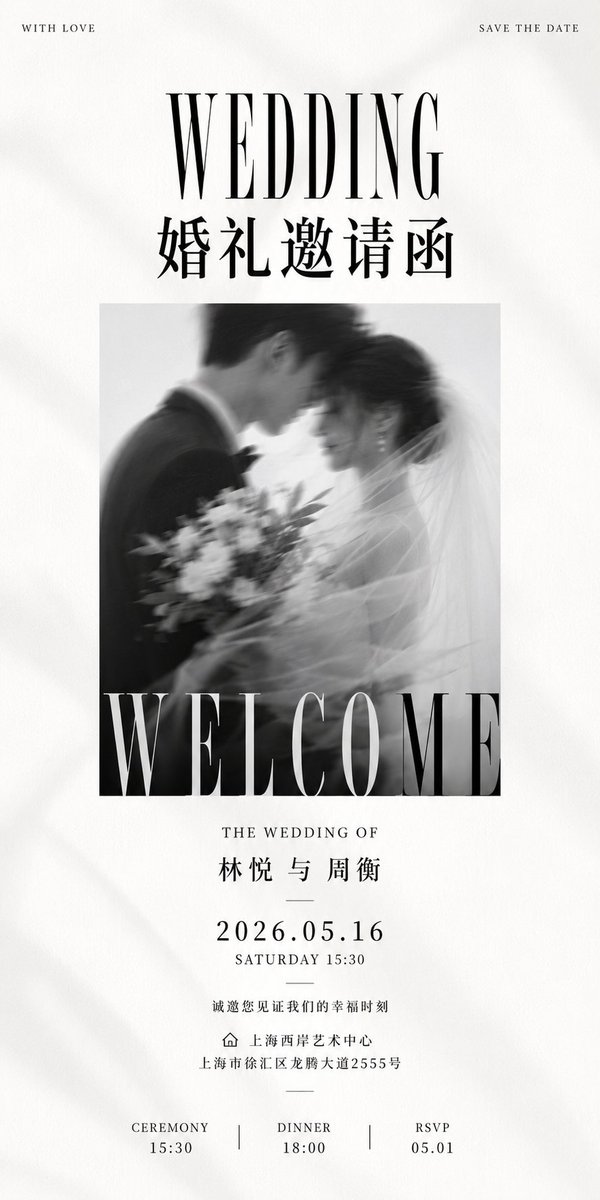
Creates a tall editorial black-and-white wedding invitation poster with Chinese and English typography for elegant wedding stationery.

Промпт
Goal: Create a tall luxury black-and-white wedding invitation poster with refined editorial typography, soft paper texture, and a romantic blurred wedding photograph. Canvas: Ultra-tall vertical invitation, 1:2 aspect ratio, off-white warm paper background with subtle grain, faint fabric-like shadows, and generous margins. Layout: Minimal centered composition. At the very top place two tiny uppercase corner captions: left “WITH LOVE”, right “SAVE THE DATE”. Below, a large high-contrast condensed serif headline “WEDDING”, then a bold Chinese title “婚礼邀请函”. In the middle, place one square black-and-white motion-blurred photo of a bride and groom leaning forehead-to-forehead; the groom is in a dark suit on the left, the bride is on the right with veil and bouquet, soft dreamy blur. Overlay the bottom edge of the photo with an enormous cropped serif word “WELCOME” in white, spanning the full photo width. Text content: Use exactly 12 visible text blocks: 1) “WITH LOVE”, 2) “SAVE THE DATE”, 3) “WEDDING”, 4) “婚礼邀请函”, 5) “WELCOME”, 6) “THE WEDDING OF”, 7) “林悦 与 周衡”, 8) “2026.05.16”, 9) “SATURDAY 15:30”, 10) “诚邀您见证我们的幸福时刻”, 11) venue line with a small outline home icon then “上海西岸艺术中心” and address “上海市徐汇区龙腾大道2555号”, 12) bottom schedule row with three columns: “CEREMONY 15:30”, “DINNER 18:00”, “RSVP 05.01”, separated by two thin vertical divider lines. Typography: Use elegant fashion-magazine serif typography with extreme contrast strokes for English headlines, narrow letter spacing for small uppercase text, crisp black ink, and traditional Chinese serif/Songti styling for Chinese text. Keep all text centered except the two top corner captions. Visual style: Monochrome, premium wedding stationery, quiet luxury, high-end art direction, tactile paper, soft shadows, romantic blur, balanced negative space, no color accents. Constraints: Include exactly one central photograph, exactly three bottom schedule columns, exactly two vertical dividers, and one small home/location icon. Do not add extra decorative flowers, borders, watermarks, QR codes, or additional text.

Як використовувати цей промпт

  1. 1

    Скопіюйте повний промпт вище.

  2. 2

    Відкрийте платформу, яка підтримує GPT Image 2, наприклад YouMind, і вставте промпт.

  3. 3

    Змініть об'єкт, стиль або деталі відповідно до вашої ідеї, а потім генеруйте.

Це безкоштовний AI-промпт із бібліотеки YouMind. Досліджуйте тисячі інших промптів для зображення, які можна безкоштовно копіювати та адаптувати.

Дослідити більше промптів для зображення
Більше функцій промптів

Бібліотека AI

Пошук AI промптів

Дозвольте AI шукати серед десятків тисяч промптів. Фільтруйте за моделлю, часовим діапазоном, ключовими словами та сортуйте за залученістю — переглядами, закладками, репостами тощо.

Інструменти зору

Зображення в промпт

Перетворіть будь-яке фото на детальний AI промпт для зображення. Безкоштовний конвертер зображень у промпти аналізує композицію, стиль та освітлення, щоб ви могли відтворити будь-який вигляд за лічені секунди.

Створено для творців. Безкоштовно назавжди.

YouMind — це творчий ШІ-копілот, якому довіряють мільйони творців у всьому світі. Кожен промпт тут підібраний так, щоб допомогти вам створювати краще та швидше.

Переглянути більше промптів