For a lot of people, this news was just about the version update, they were hoping tokens would stop burning so fast.
But they actually started burning through tokens even faster and blamed it all on Claude. No matter what plan they're on Pro or Max, people hit the limit in 30 minutes and point the finger at Claude.
But it's not Claude's fault, it's the users' fault!
Most of you use Claude like this:
1Open chat → get answer → close → open new chat → repeat2Open IDE → send request → send another → no context → repeat
And that's exactly why your tokens evaporate. If you keep working like this, your daily limit will keep running out in half an hour.
This guide shows you exactly how to save tokens without losing performance.
How to read this guide
This isn't a benchmark breakdown. It's a practical setup guide - how to actually configure Opus 4.8 so you stop wasting tokens.
- WHY YOUR TOKENS DISAPPEAR - the mistake almost everyone makes.
- EFFORT CONTROL - how to match thinking depth to the task and cut spend several times over.
- FAST MODE - when to use it and when to avoid it.
- DYNAMIC WORKFLOWS - run up to 1,000 agents from one prompt.
- CLAUDE FOR CONTENT & MARKETING - how I personally use Claude to create viral posts and streamline my content workflow.
- DAILY CHEAT SHEET - the exact commands I use every day.
- CONFIG - env variables and safe permissions.
- CONCLUSION - stop blaming Claude
WHY YOUR TOKENS DISAPPEAR
Let's start by figuring out why your tokens disappear so fast.
Every time you send a message, the model doesn't just process your latest prompt. It re-reads everything:
- every file you attached
- every previous message
- every tool result
And the bigger your chat history, the more files you attach - the more tokens you burn.
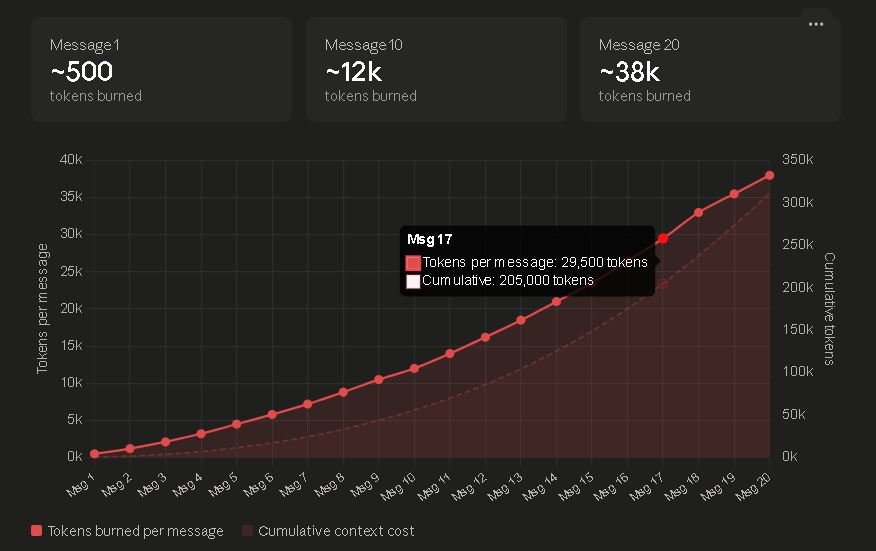
Token burn per message graph.
Mistakes almost everyone makes
The first mistake
1→ ask "what does this function return?"2→ model thinks at High effort3→ burns reasoning tokens on a 2-second question4→ repeat 50 times a day
You just spent Max-level thinking on a question that needed none.
The second mistake: cranking everything to Max "to be safe"
1"I'll just set it to max so I get the best answer"2→ every prompt now burns 4-8x more tokens3→ even when the task is trivial4→ limit hits in 30 minutes
Using Max effort on trivial tasks is a waste, you're paying for thinking power you're not using.
Third mistake: never compacting
1By message 40, the model re-reads thousands2of tokens of history every single turn.34You're paying for the same context over and over.
The rate is identical at every effort level - $5/$25 per 1M tokens.
You don't pay more per token for thinking harder. You pay because the model generates more tokens.
You should spend tokens where they matter, save them where they don't.
EFFORT CONTROL
This is the feature that saves you the most tokens.
Opus 4.8 lets you control how much thinking it puts into each task.
Five levels:
1/effort low # quick questions, formatting, lowest token use2/effort medium # everyday coding, balanced3/effort high # default, solid reasoning4/effort xhigh # deeper, for complex code and agents5/effort max # maximum, no token cap6/effort auto # let the model decide
In Claude .ai and Cowork it's a slider next to the model picker:
Low → Medium → High → Extra → Max
In Claude Code it's the commands above. "Extra" in the app and "xhigh" in Claude Code are the same level - just different labels.
How much each level actually costs:
1Level Thinking depth Token spend Best for2Low minimal ~0.1x formatting, simple questions3Medium moderate ~0.4x routine edits, drafts4High solid 1x (baseline) daily coding (default)5Extra deeper ~2-3x complex code, agents6Max maximum ~4-8x heavy architecture
Real money example:
A High answer costs ~$0.05
A Low answer costs ~$0.005
A Max answer costs ~$0.20-0.40
The move is simple:
Stop leaving everything on one level.
Route effort per task: Small stuff on Low, daily work on High and only THE HARDEST PROBLEMS on Max.
That one habit alone is the difference between hitting your limit in 30 minutes and working comfortably all day.
FAST MODE
Fast mode runs Opus 4.8 at 2.5x speed and it's now 3x cheaper than it used to be.
1Standard Opus 4.8: $5 / $25 per 1M tokens2Fast mode: $10 / $50 per 1M tokens (2.5x speed)3Previously: $30 / $150 per 1M tokens
Fast mode used to cost $30/$150 - six times more than standard. Now it's only double the rate for 2.5x the speed. For the right tasks, that's a straight upgrade.
Toggle it in Claude Code:
1/fast
When to use it:
- large multi-file refactors
- code generation from a spec
- documentation and test generation
Basically anything where the model already knows what to do and just needs to do it fast.
When to avoid it:
- complex debugging
- architecture decisions
- security review
The combo that actually saves tokens: use fast mode for bulk work (refactors, tests, docs) and standard High for thinking work (debugging, architecture). Match the mode to the job - speed where you want it, depth where you need it.
DYNAMIC WORKFLOWS
This is the biggest feature in the Opus 4.8. release - and the one you need to scope carefully or it'll eat your tokens alive.
Сlaude Code now writes a JavaScript orchestration script for your task and runs it in the background. The beauty of it is that the plan lives in code instead of the model's context, so only the final answer comes back to your session, and your terminal stays responsive while all the heavy work happens in the background.
The numbers:
1Up to 16 subagents running concurrently2Hard ceiling of 1,000 total per run3Resumable: if your laptop dies, it picks up where it stopped4Requires Claude Code v2.1.154+
Trigger it with /effort ultracode or just describe a big task:
1/effort ultracode2"Audit every endpoint under src/routes/ for missing auth checks"
When it's worth it:
- migrations across 200+ files
- full-codebase security audits
- project-wide test generation
- large refactors
- research across multiple repos
When it's overkill:
- simple bug fixes
- single-file edits
- quick questions
Now the important part - cost.
Workflows consume meaningfully more tokens than a normal session. Spinning up dozens of subagents means dozens of parallel context windows, all burning tokens at once.
The official way to keep spend in check: scope the task, run the audit on one folder first, see how many subagents it spawns, then calibrate the big run from there.
1# test first2"audit src/routes/auth/ for missing checks"34# then scale once you know the cost5"audit all of src/ for missing checks"
To disable workflows entirely:
1CLAUDE_CODE_DISABLE_WORKFLOWS=1
Availability: on by default for Max, Team, and Enterprise. On Pro, turn it on in /config (and switch to Opus 4.8 first).
The rule with workflows: this is a power tool, not a default. Use it for the genuinely huge tasks where 1,000 agents save you days of work - not for things a single High-effort prompt handles fine.
CLAUDE FOR CONTENT & MARKETING
This is where I actually use Claude every day - not just for code. At the same time, I use it very, very much and never reach the limits, I always have enough tokens.
Content generation
Honestly, I could write a whole separate article about this - maybe even a few. So I'll keep it short here.
I don't hit "generate" and post raw output and nobody serious does.
The process looks like this:
1Dump messy thoughts + my take into a draft23→ feed it to Claude with my skill file4→ get a structured version back5→ manually rewrite the intro, cut the filler, add my voice back6→ post
The secret weapon is a skill file - a markdown file with my writing rules, tone, post formulas, and examples of what performs.
I paste it at the start of every session so Claude writes in my voice instead of generic AI tone.
Without files like these, there's no way you're getting good writing out of any AI.
Recently I shared one of the .md files from my own collection - you can grab it and see exactly how it works:
Vibe coding in Cursor
I'm someone who has written, and still writes, a lot of code.
I used to work exclusively in C++ and even solved 400+ Leetcode problems prepping for FAANG interviews. But once AI entered coding, I immediately saw it for what it was: a way to knock out freelance tasks at a speed that wasn't possible before.
A freelance job that used to take a full week now takes a single day and that's exactly what I do in my free time.
But tasks like these eat a lot of tokens, so knowing how to save them is the whole game.
Here are the hacks that save me the most:
1- keep a CLAUDE.md / .cursorrules in every project2 so you never re-explain your stack3- use Low effort for boilerplate, High for logic4- one feature per chat — don't let context bloat5- compact or start fresh every 30-40 messages6- ask for a plan BEFORE code on big changes7 (saves you from undoing wrong approaches)
The biggest one: describe the outcome, not the steps. "build a dropdown that filters by category" beats micromanaging every line.
Marketing work
This is where Claude saved me real money and real reputation.
1. Replacing legal consultation
When agencies come to you with a contract and you're just starting out, you don't want to drop big money on lawyers, but you still need to understand what you're signing - this is where AI stepped in for me.
One important caveat: this only works for simple contracts. complex agreements still need real experts.
Contracts often hide clauses that only hurt you - responsibility you should never carry.
Once I got a contract with this line:
"if you fail to bring us a minimum of N users, you must return all payments made to you."
That's nonsense. That's not how advertisers work.

The prompt I use:
1Here's a contract. break down:231. What this contract actually means in plain terms42. How it benefits me53. Any clauses that could harm me or put unfair6 responsibility on me74. Anything that's unusual or a red flag for this8 type of deal
This alone can save you $1,000+ in legal fees and a bad signature.
And imagine that you need to analyze a lot of such contracts, for example, if you work in Marketing - here it is very important to be able to save tokens.
2. Project analysis (reputation insurance)
I once almost signed with scam Coin - a project that was officially flagged as scammers but kept operating like nothing happened. AI helped me verify the whole story and saved me from torching my reputation in the AI sector.
The prompt i use:
1Analyze this project: [site, docs, team, tweets]2Check for: scam flags, legal issues, community3Complaints, red flags in tokenomics or claims.4Would associating with them damage my reputation?
In this space your reputation is everything. One bad partnership and people remember. AI lets you do due diligence in minutes instead of trusting a logo and a nice DM.
3. KOL list management at scale
When you work in marketing with a lot of people - sometimes over a hundred, filtering KOLs by audience quality, fake engagement, metrics, and actual influence in the niche is critical for buying and selling ads.
The real pain: you've got several spreadsheets where the same KOL has different prices in each, and the client needs one clean list. Doing that by hand takes a week. through AI it takes minutes.
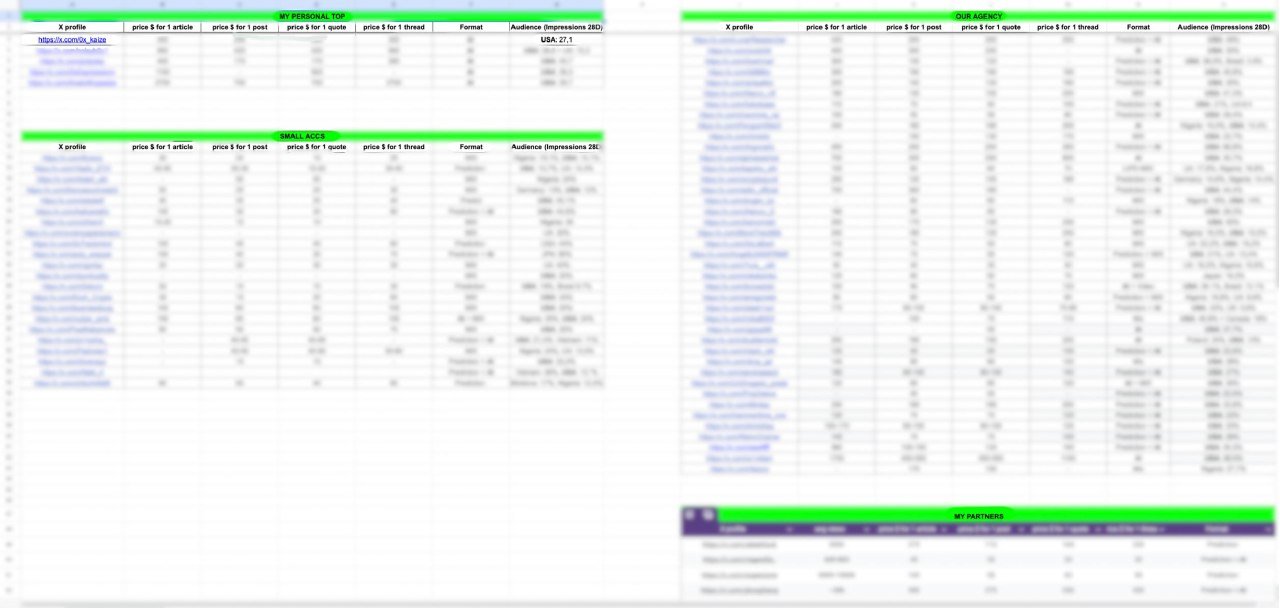
The prompt i use:
1Here are 5 spreadsheets of KOLs with different2Prices and stats. merge into one list,3Deduplicate, flag price conflicts, filter out4Anyone with fake-looking engagement, and rank5By audience quality for an AI campaign
What used to be a week of manual work is now a single prompt and a review pass.
And I work with this every single day: on top of content creation, on top of vibe coding, on top of a dozen other things. imagine how many tokens I burn through.
I'd run out in no time if I didn't use the tips above!
Special shoutout to @zefirium who taught me how to actually use AI for marketing. if you're serious about marketing and AI startups, he's worth a follow.
DAILY CHEAT SHEET
These are the exact commands I run every day. screenshot this section - it's the whole guide in one place:
1EFFORT CONTROL2/effort low # "what does this function return?"3/effort medium # routine edits, drafts, summaries4/effort high # daily coding (default)5/effort xhigh # complex code, agents, long tasks6/effort max # heavy architecture, hardest cases7/effort auto # let the model decide89SPEED10/fast # large refactors, docs, test gen11 # (speed over depth)1213BIG TASKS14/effort ultracode # full codebase audit, migrations15 # (scope it first!)1617MODEL SWITCHING18/model opus # complex work19/model sonnet # simple tasks20/model haiku # throwaway questions2122SESSION HYGIENE23/compact # every 30-40 messages24/config # toggle settings (workflows, etc.)
The daily rhythm that keeps my limit alive:
1start of day → /effort high2quick question → /effort low3big refactor → /fast4huge task → /effort ultracode (scoped)5simple stuff → /model sonnet or haiku6long session → /compact every 30-40 msgs
You should know these commands just like you know the shutdown button on your computer.
CONFIG
Set this up once and you never think about it again.
Environment variables
Add these to your ~/.zshrc or ~/.bashrc:
1# set Opus 4.8 as default model2export ANTHROPIC_MODEL="claude-opus-4-8"34# persistent default effort level5export CLAUDE_CODE_EFFORT_LEVEL=high67# disable dynamic workflows entirely (optional)8# export CLAUDE_CODE_DISABLE_WORKFLOWS=1
Now every session starts on the right model and effort level without you touching anything.
Safe permissions (settings.json)
This is the part most people skip - and it's what lets the agent work freely without breaking or leaking anything.
The idea: let Claude read and edit code, run tests, and commit, but hard-block the dangerous stuff. reading .env files and SSH keys, rm -rf, sudo, and git push.
1{2 "permissions": {3 "allow": [4 "Read", "Edit", "Write",5 "Bash(npm test)",6 "Bash(npm run *)",7 "Bash(git add *)",8 "Bash(git commit *)"9 ],10 "deny": [11 "Read(.env)",12 "Read(**/*.pem)",13 "Read(~/.ssh/**)",14 "Bash(rm -rf *)",15 "Bash(sudo *)",16 "Bash(git push *)"17 ]18 }19}
With this, the agent operates freely inside your project but physically can't:
read your secrets (.env, SSH keys, certs) nuke your files (rm -rf) run privileged commands (sudo) push to remote without your say-so
Why this matters for tokens too:
A misconfigured agent that touches the wrong thing means re-running the whole task, debugging the mess, and burning tokens twice. Safe permissions keep your runs clean the first time.
The full ready-to-paste settings.json is too long to read cleanly inline - I'll drop the complete version in my github (kaize os/claude/tokens-economy-config).
Set the env variables, paste the permissions, and your setup is locked in.
CONCLUSION
Opus 4.8 isn't burning your tokens. your setup is.
The model gives you full control now - effort levels, fast mode, workflows, model switching.
The people who configure it get the same results for a fraction of the cost. Everyone else leaves it on default, cranks it to max "to be safe," and blames Claude when the limit hits in 30 minutes.
Do that, and you'll stop running out - and start wondering how you ever worked any other way.
Stay tuned!
Good luck :)