Cosa costa una singola sessione, misurata in entrambi i modi
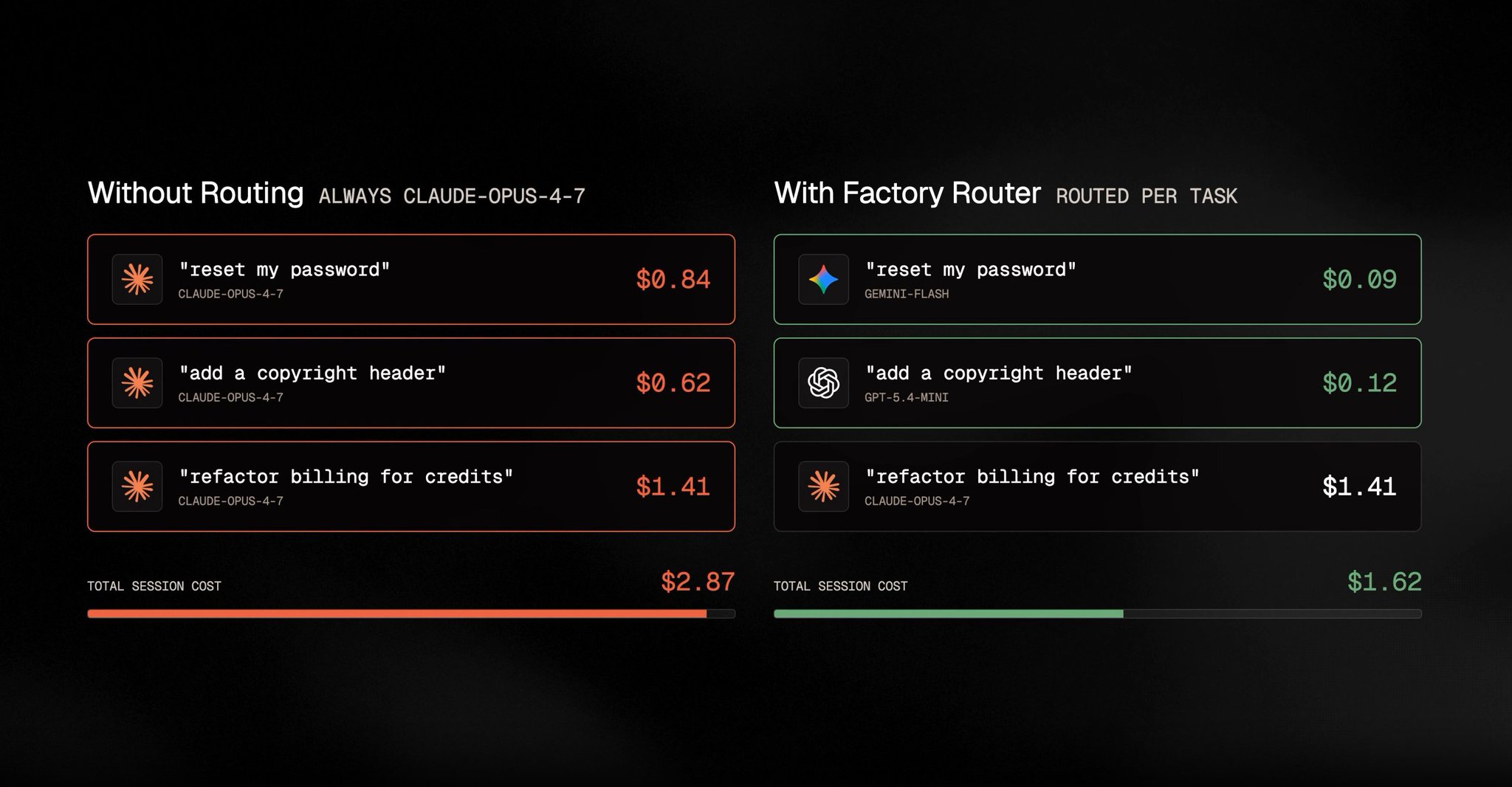
Prendi una sessione Droid con tre attività: reimpostare un sistema di password, aggiungere un'intestazione di copyright e rifattorizzare il servizio di fatturazione. Eseguile tutte su un modello Claude all'avanguardia come Opus e il costo sarà rispettivamente di $0,84, $0,62 e $1,41, per un totale di $2,87 per la sessione.
Instradale invece per complessità. Le prime due sono attività di routine, quindi scendono a $0,09 e $0,12 su modelli efficienti, mentre la rifattorizzazione rimane sul modello all'avanguardia a $1,41. La sessione totalizza $1,62, lo stesso output per il 43% in meno, e l'unica variabile cambiata è stato quale modello ha gestito quale attività.
La maggior parte dei team di sviluppo sceglie un modello e lo lascia lì. Non perché sia ottimale. Ma perché cambiare a metà sessione significa perdere il contesto, attriti aggiuntivi, una decisione che nessuno vuole prendere 40 volte al giorno. Quindi indirizzano tutto verso il modello più capace che possono permettere e smettono di guardare il conto.
Questa impostazione predefinita ha un costo. Il modello costoso non è la scelta sicura. È solo quello costoso. E il divario di qualità sulle attività di routine si è chiuso abbastanza velocemente che il calcolo non regge più.
Factory Router risiede all'interno della piattaforma Droids e instrada automaticamente ogni attività: il lavoro di routine ai modelli efficienti, quello complesso ai modelli all'avanguardia, con il contesto completo trasferito a ogni cambio. I numeri delle sessioni sopra provengono dal loro benchmark di lancio. Factory non vende modelli, il che significa che non ha alcun incentivo strutturale a tenerti sul percorso costoso. Vale la pena notarlo quando leggi i numeri.
Il problema che nessuno misura
Ogni sessione Droid gira su un modello, e la maggior parte dei team sceglie Opus e non riconsidera mai la scelta. Il costo di questa impostazione predefinita è invisibile perché non si manifesta mai come un errore. Il lavoro viene fatto, l'output è buono, e il conto è solo silenziosamente più alto del necessario.
La singola sessione sopra spreca circa $1,25. Sembra niente finché non lo moltiplichi. A 10.000 sessioni al mese, la stessa impostazione predefinita trasforma $16.400 di spesa necessaria in $28.700 di spesa effettiva, che equivale a $147.600 all'anno pagati per instradare lavoro di routine attraverso un modello all'avanguardia che non era mai stato necessario per farlo.
La maggior parte dei team scopre che dal 30 al 50 percento delle loro sessioni sono lavoro di routine eseguito sul loro modello più costoso. Questo divario è l'intera opportunità, e ciò che segue sono quindici regole in tre sezioni per colmarlo.
→ Regola 1: Classifica i tipi di attività prima di qualsiasi altra cosa:
1Look at your last 30 Droid tasks. Sort them into two groups:23Frontier-worthy: tasks involving system architecture, auth, payments, security,4cross-service dependencies, anything where being wrong costs time to debug or5reverts. Complex refactors over 100 lines of business logic.67Routine: doc updates, config changes, adding tests to existing functions,8small bug fixes with clear specs, copyright headers, README edits,9boilerplate generation, simple migrations.1011Count each group.1213Based on Factory's session-level data:14"reset my password" type tasks: Opus $0.84 vs routed $0.09. 89% cheaper.15"add copyright header" type tasks: Opus $0.62 vs routed $0.12. 81% cheaper.1617Multiply your routine task count by that difference.18That gap is your current model selection tax.
→ Regola 2: Misura la spesa effettiva, non quella presunta:
1Pull your last month of Droid session logs.23For each session:4- Task type (from Rule 1 classification)5- Model used6- Cost78Calculate:9- Total spend on routine tasks using frontier models10- What those tasks would cost on efficient models (apply 80-90% reduction)11- Monthly savings available from routing1213This is your baseline before enabling Factory Router.14Most teams find 30-50% of sessions are routine work running on frontier models.
→ Regola 3: Scrivi descrizioni delle attività che segnalano la complessità:
1The way you describe a task signals its complexity to any routing system.23Low-complexity signals (routes to efficient models):4- "Simple config update, no business logic: change timeout in config.yaml from 30 to 60"5- "Add missing JSDoc comments to the utility functions in /helpers"6- "Update the README to reflect the new deployment steps"78High-complexity signals (routes to frontier):9- "Refactor the auth middleware to support our new SSO integration across 3 services"10- "Debug the race condition in the payment processor that only appears under concurrent load"11- "Redesign the rate limiting system to handle per-tenant thresholds"1213Specific, context-rich task descriptions improve routing accuracy.14Vague descriptions get routed conservatively to frontier models.
→ Regola 4: Calcola il ROI annuale dell'instradamento:
1Formula for estimating Factory Router savings:23Monthly sessions: [N]4Average cost per session without routing: [Opus baseline in $]5Routine task percentage: [% from your Rule 1 audit]6Routine cost reduction: 80-90%78Monthly savings estimate:9N × baseline × routine% × 0.85 = monthly dollars recovered1011Annual: multiply by 12.1213For a team running 5,000 sessions/month at $2.87 average with 40% routine work:145,000 × $2.87 × 0.40 × 0.85 = $4,879/month = $58,548/year1516This is the minimum. Missions (long-running autonomous work) compound the savings further.
→ Regola 5: Documenta cosa significa "solo frontier" per il tuo codebase:
1Before enabling routing, define what must stay on frontier models for your codebase.23Write this once. Paste it as your routing guidance baseline:45"The following always require frontier models:6- Any changes touching [auth/payments/security layer]7- Cross-service refactors with more than [N] files8- Changes to CI/CD pipeline configuration9- Database schema migrations10- Anything flagged as [P0/critical] in our issue tracker1112Everything else is eligible for routing to efficient models."1314This becomes your routing policy document.15You update it as you learn what needs frontier treatment in your specific codebase.
team di 10 sviluppatori, 1.000 sessioni/mese, 40% di routine: $13.776/anno recuperati team di 50 sviluppatori, 5.000 sessioni/mese, 40% di routine: $58.548/anno recuperati enterprise (scala Nvidia, Adobe): risparmi annuali a sei cifre
errore da evitare: non cercare di classificare manualmente ogni attività prima di abilitare Router. Il Router gestisce la classificazione. Il tuo compito è definire le regole rigide per ciò che deve rimanere sul frontier e lasciare che il sistema gestisca tutto il resto.
0:28
→ Regola 6: Abilita Factory Router in un unico passaggio:
1In Factory CLI or Desktop App:231. Open the model picker42. Select "Factory Router"53. Done.67No configuration required to start. Router uses default routing logic immediately.89To verify it's active:10Run a simple task ("update a comment in this file").11Check the session log for model attribution.12You should see an efficient model handling it, not Opus.1314If you see Opus on a simple task, verify Router is selected and not a specific model override.
→ Regola 7: Imposta le linee guida di instradamento per il tuo codebase:
1Routing guidance is advisory. It helps the Router make better decisions2for your specific codebase. It does not force a model.34Paste this as your routing guidance starting point and edit for your stack:56"Auth, payments, and security changes: frontier models.7Database migrations and schema changes: frontier models.8API contract changes that affect external consumers: frontier models.910Documentation updates: efficient models.11Adding tests to existing functions: efficient models.12Config and environment variable changes: efficient models.13Boilerplate generation and scaffolding: efficient models.14Code comments and JSDoc: efficient models.15README and changelog updates: efficient models.1617Everything else: Router decides based on task context."
→ Regola 8: Configura le linee guida di instradamento per la governance aziendale:
1For teams running agents at scale, routing guidance becomes a governance document.23Standard template for regulated industries (banking, healthcare, enterprise SaaS):45"High-sensitivity routing rules:6- Anything touching [PII / financial data / auth] = frontier only7- Any external API changes = frontier only8- Production deployment scripts = frontier only9- Incident response tasks = frontier only1011Standard routing:12- Development, staging, and test environments = Router decides13- Internal tooling and automation = efficient models preferred14- Documentation, reporting, and communication = efficient models1516Override policy:17Any developer can request frontier on a task.18Router treats this as a hard override, not advisory.19Log all frontier overrides for monthly review."2021Save this as ROUTING_POLICY.md in your project root.22Reference it in your CLAUDE.md or equivalent context file.
→ Regola 9: Esegui Missions con l'instradamento abilitato:
1Missions are Factory's long-running autonomous tasks.2Hours or days of work. No supervision required.34With Factory Router enabled, Missions benefit from the same routing logic.5Each step in a Mission gets routed appropriately.6Simple steps in a complex Mission run on efficient models.7The Mission pays frontier rates only when frontier reasoning is actually needed.89To configure:10Enable Factory Router before starting any Mission.11Add routing guidance that reflects the Mission's complexity profile:1213"This Mission involves [high-complexity core work] and [routine supporting tasks].14Core work (architectural decisions, security analysis): frontier.15Supporting work (documentation, config, boilerplate): efficient models.16Use the most efficient model available for any step17that doesn't require the reasoning specified above."1819Long Missions see proportionally larger savings because they accumulate more routine steps.
→ Regola 10: Imposta una politica di failover del provider:
1Factory Router routes across providers for reliability.2If one provider path degrades, sessions continue through a healthy provider.34For enterprise teams with uptime requirements:56"Reliability routing policy:7- Primary provider per model: [list your preferred providers]8- Failover trigger: any request failing or exceeding [N] second latency9- Failover behavior: same model, different provider if available.10 If same model unavailable, escalate to next frontier model.11- Dedicated TPM: confirm with Factory account team for your tier.12- Target: 99.9%+ request reliability.1314Log all failover events. Review weekly for provider health patterns."
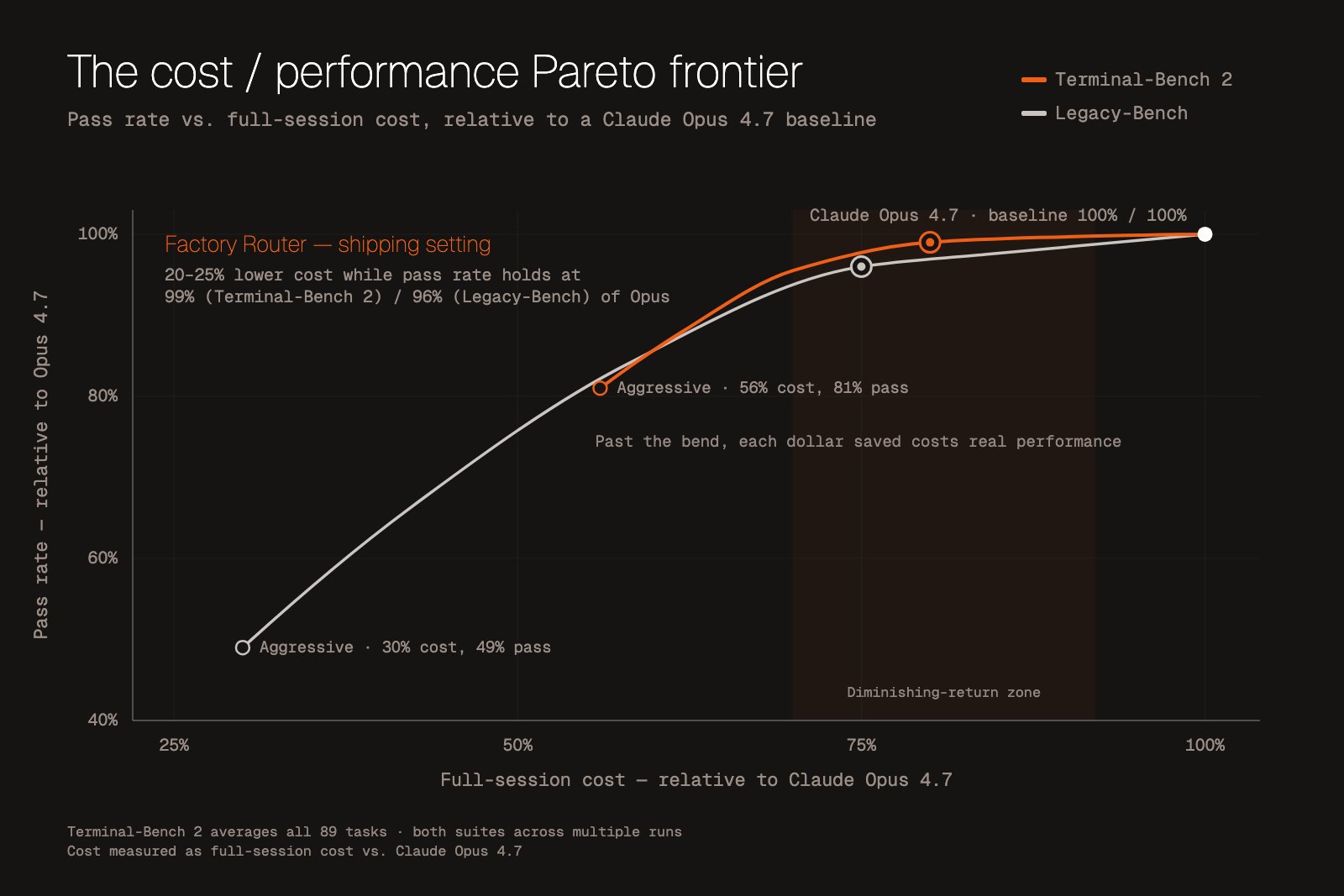
Terminal-Bench 2: 99% del tasso di superamento di Opus con un costo inferiore del 20% Legacy-Bench: 96% del tasso di superamento di Opus con un costo inferiore del 25% Affidabilità delle richieste al 99,9%+ grazie all'instradamento tra provider
3 / 3 | IL SISTEMA: eseguire Factory alla scala in cui i risparmi si accumulano
La storia del risparmio sui costi è interessante a livello del singolo sviluppatore. Diventa significativa a livello di team. Alla scala enterprise, è una voce di bilancio.
Nvidia. Adobe. EY. Palo Alto Networks. Adyen. Questi sono i clienti enterprise di Factory.
Un team che esegue 5.000 sessioni al mese recupera $58.548 all'anno dal solo instradamento, con un tasso di attività di routine del 40%. Un team a 50.000 sessioni recupera $585.480. La matematica scala linearmente con il volume. Le fatture dei token enterprise non sono lineari.
Il punto più profondo riguarda l'architettura. La maggior parte delle piattaforme AI agent sono costruite su un presupposto di modello singolo. Un team, un modello, un fornitore. La piattaforma di Factory è agnostica rispetto al modello per progettazione: qualsiasi LLM (Claude, GPT, Gemini, Llama, open source), qualsiasi interfaccia (CLI, Desktop, VS Code, Slack, GitHub, Linear, Jira, pipeline CI), qualsiasi fase del ciclo di vita del software.
Router è un livello di quell'architettura. È il livello di controllo dei costi. Lo stesso contesto Droid che funziona nel tuo terminale funziona in Slack. La stessa politica di instradamento che si applica alle sessioni individuali si applica alle Missions che durano giorni.
Le ultime cinque regole costruiscono il sistema Factory completo attorno a Router.
→ Regola 11: Misura i risparmi dell'instradamento settimanalmente:
1Set a weekly routine to track Router performance.23Check in Factory session logs:41. Total sessions this week52. Model distribution (what % went to each model)63. Cost with routing vs baseline (Opus on everything)74. Any sessions where Router escalated to frontier (quality signal)89Report format:10> sessions: [N]11> efficient model usage: [%]12> frontier model usage: [%]13> actual spend: $[amount]14> baseline (all Opus) would have been: $[calculated]15> weekly saving: $[amount]16> escalations to frontier: [N] (review for routing guidance improvements)1718If escalation rate is above 10%, review your routing guidance.19Too many escalations means routine tasks are being described as complex.
→ Regola 12: Valutazione della prontezza dell'agente prima del rollout completo:
1Before deploying Factory Router for your full team, run Factory's Agent Readiness assessment.23It evaluates 100+ signals across:4- Codebase health (test coverage, CI reliability, documentation)5- Workflow maturity (PR process, code review standards, deployment pipeline)6- Team readiness (familiarity with agentic tools, existing automation)78Use the output to prioritize which workflows to route first.910High-readiness workflows: deploy Router immediately, full routing enabled.11Medium-readiness workflows: deploy Router with conservative guidance, more frontier tasks.12Low-readiness workflows: build readiness before routing.13Agentic tools on unprepared codebases spend more time on frontier models correcting errors.1415Router savings are highest in high-readiness environments.
→ Regola 13: Costruisci il tuo pool di modelli deliberatamente:
1Factory Router draws from a pool of frontier and efficient models.2The pool you configure affects the routing options available.34Recommended starting pool:56Frontier tier (complex work):7- Claude Opus (latest version)8- GPT-5.2 (if in your approved vendor list)910Efficient tier (routine work):11- Kimi K2.6 (best value per F1 point for code tasks)12- MiniMax M2.7 (lowest cost for simple tasks)1314Add models as you validate performance on your codebase.15Start with the two-tier structure.16Expand to three tiers (frontier / mid / efficient) once you have routing data.1718Document which models are approved for which compliance requirements.19If your enterprise restricts certain model providers, configure the pool accordingly.20US-hosted open-source models are available through Factory for environments requiring data residency.
→ Regola 14: Integra l'instradamento nella tua pipeline CI:
1Factory works in CI pipelines. Routing applies there too.23Add Factory Router to your GitHub Actions workflow:45For pull request reviews:6"Route PR review tasks by file change scope.7- Security and auth file changes: frontier models8- Test files: efficient models9- Documentation changes: efficient models10- Mixed PRs: route section by section if possible, otherwise frontier for the full review"1112For automated QA:13"Route QA tasks by test complexity.14- Critical path end-to-end tests: frontier models15- Unit test generation: efficient models16- Regression test suites: efficient models"1718CI routing compounds savings because it runs on every commit.19The cost difference between Opus and Kimi K2.6 on test generation across 100 daily commits is material.
→ Regola 15: Imposta revisioni mensili delle politiche di instradamento:
1Routing guidance should evolve as your codebase and team grow.23Monthly review agenda (30 minutes):451. Cost report: actual vs baseline, savings trend62. Escalation analysis: which tasks escalated and why73. Routing guidance update: does current guidance still reflect codebase complexity?84. New model evaluation: any new models in the pool worth adding?95. Team feedback: are developers overriding Router frequently? Why?1011Questions that signal your routing guidance needs updating:12- Escalation rate above 15%: guidance is too aggressive toward efficient models13- Escalation rate below 2%: guidance may be too conservative, leaving savings on the table14- Developer override rate above 20%: Router is not matching developer expectations1516Update ROUTING_POLICY.md after every review.
senza Factory Router: ogni sessione gira sul frontier, indipendentemente dal tipo di attività con Factory Router: attività di routine sui modelli efficienti, attività complesse sul frontier risultato: riduzione dei costi del 20-43% con il mantenimento del 96-99% delle prestazioni di benchmark del frontier
CONCLUSIONE
Ecco dove atterra la matematica.
il 40-60% delle sessioni Droid di ingegneria sono attività di routine nella maggior parte dei team quelle sessioni su Opus: $2,87 in media per sessione quelle sessioni con instradamento: $1,62 in media a 10.000 sessioni al mese: $147.600 recuperati all'anno
I numeri di benchmark reggono: 99% del tasso di superamento di Opus su Terminal-Bench 2 con un costo inferiore del 20%. 96% su Legacy-Bench con un costo inferiore del 25%. La cache dei prompt rimane intatta durante i cambi di modello, quindi la qualità non cala quando il router cambia modello a metà sessione. Il failover del provider mantiene le sessioni in esecuzione con un'affidabilità del 99,9%+.
Factory Router è in anteprima di ricerca privata. Lo selezioni una volta nel selettore di modelli. Nessuna configurazione aggiuntiva.
Quello che sto ancora cercando di capire: quanto funzionano bene le linee guida di instradamento consultive attraverso diversi tipi di codebase. Impostare regole come "modifiche auth = frontier, modifiche doc = routine" sembra pulito sulla carta. Cosa succede quando un'attività si trova nel mezzo? Questo è il caso limite che vale la pena osservare man mano che più team iniziano a usarlo.
Le 15 regole sopra sono il sistema di configurazione. Inizia con le Regole 1 e 6.
p.s. la riga che la maggior parte delle persone scorrerà velocemente: Factory non vende modelli. non traggono profitto dalla tua fattura dei token. quella differenza strutturale è il motivo per cui un sistema di instradamento come questo esiste in primo luogo. curioso di vedere cosa succederà man mano che più modelli verranno aggiunti al pool.
Segnalibro prima che venga sepolto
Se è stato utile, condividilo con una persona che ne ha bisogno