Captura de pantalla de demostración de AI Cutout
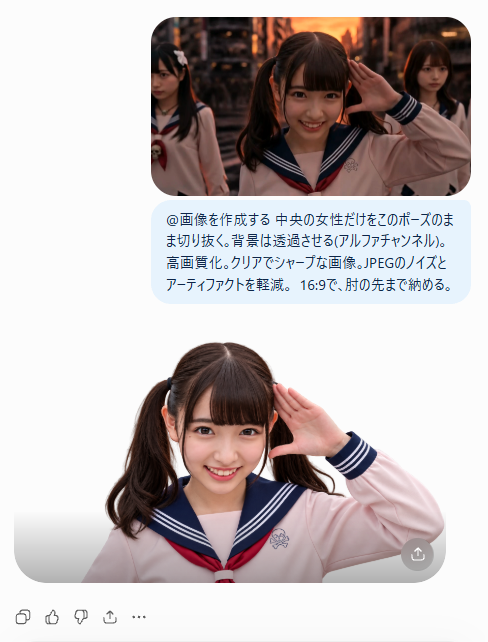
Una maqueta de interfaz móvil vertical que muestra un resultado fotorrealista de eliminación de fondo en una estudiante para la creación de miniaturas.

Instrucción
Goal: Create a clean mobile-style social media screenshot demonstrating an AI background-removal result for a thumbnail image. Canvas: Vertical 488×641 px composition on a pure white background, with generous margins and a centered content column. Layout: At the top, place one rounded-corner rectangular photo, about 318 px wide, showing three Japanese schoolgirls in sailor-style uniforms in a warm sunset urban street scene. The central girl is closest to camera, smiling brightly and raising her right hand beside her face in a salute-like pose; the two other girls are behind her, one on the left partly cropped and looking serious, one on the right in the background. Use cinematic dusk lighting with orange highlights and shallow depth of field. Prompt bubble: Directly below the top photo, add one pale light-blue rounded speech bubble containing Japanese text in dark navy. Preserve the text exactly as: 「@画像を作成する 中央の女性だけをそのポーズのまま切り抜く。背景は透過させる(アルファチャンネル)。高画質化。クリアでシャープな画像。JPEGのノイズとアーティファクトを軽減。16:9で、肘の先まで納める。」 The bubble should be aligned under the image and look like a chat prompt. Result image: Below the bubble, show one large cut-out portrait of only the central girl from the top image, isolated against a white/transparent-looking background. She remains in the same salute pose, smiling, with twin ponytails, straight bangs, a pale pink sailor uniform, navy sailor collar with white stripes, and a red necktie. Re-light her cleanly and evenly so the face is sharper and brighter than in the top photo. Crop from upper torso to just past the raised elbow, with a soft rounded gray bottom container edge like an image preview. Add one small circular gray share/download button at the bottom-right corner of the result preview. Bottom UI: Along the lower left margin, draw exactly five small gray interaction icons in a row: copy/duplicate, thumbs up, thumbs down, share/upload arrow, and ellipsis menu. Customizable subject details: The main cutout subject is a smiling Japanese teenage schoolgirl with twin ponytails and straight bangs; the uniform is pale pink sailor-style school uniform with navy collar, white stripes, and red necktie; the top background is warm sunset urban street with cinematic bokeh; the chat bubble text is @画像を作成する 中央の女性だけをそのポーズのまま切り抜く。背景は透過させる(アルファチャンネル)。高画質化。クリアでシャープな画像。JPEGのノイズとアーティファクトを軽減。16:9で、肘の先まで納める。. Visual style: Photorealistic portraits embedded in a minimal app interface, crisp shadows, rounded corners, clean white UI, high-resolution thumbnail demonstration. Avoid extra people beyond the three in the top image and the single isolated cutout below; avoid watermarks or additional text.

Cómo usar este prompt

  1. 1

    Copia el prompt completo de arriba.

  2. 2

    Abre una plataforma compatible con GPT Image 2, como YouMind, y pega el prompt.

  3. 3

    Cambia el tema, el estilo o los detalles según tu idea y luego genera.

Este es un prompt de IA gratuito de la biblioteca de prompts de YouMind. Explora miles de prompts de imagen más, todos gratis para copiar y adaptar.

Explorar más prompts de imagen

Más funciones de prompts

Biblioteca de IA

Búsqueda de prompts con IA

Que la IA busque entre decenas de miles de prompts. Filtrá por modelo, rango de fechas y palabras clave, y ordená por interacción: vistas, guardados, reposts y más.

Herramientas de visión

Imagen a prompt

Convierte cualquier foto en un prompt de imagen IA detallado. El conversor gratuito de imagen a prompt analiza composición, estilo e iluminación para recrear cualquier estética en segundos.

Creado para creadores. Gratis para siempre.

YouMind es el copiloto creativo con IA en el que confían creadores de todo el mundo. Cada prompt está curado para ayudarte a crear mejor y más rápido.

Explorar más prompts