Aquí está la traducción al español (Latinoamérica), siguiendo todas las reglas de formato, código, y localización:
I don't use Codex or Claude Code directly anymore.
I use OpenClaw as my orchestration layer. My orchestrator, Zoe, spawns the agents, writes their prompts, picks the right model for each task, monitors progress, and pings me on Telegram when PRs are ready to merge.
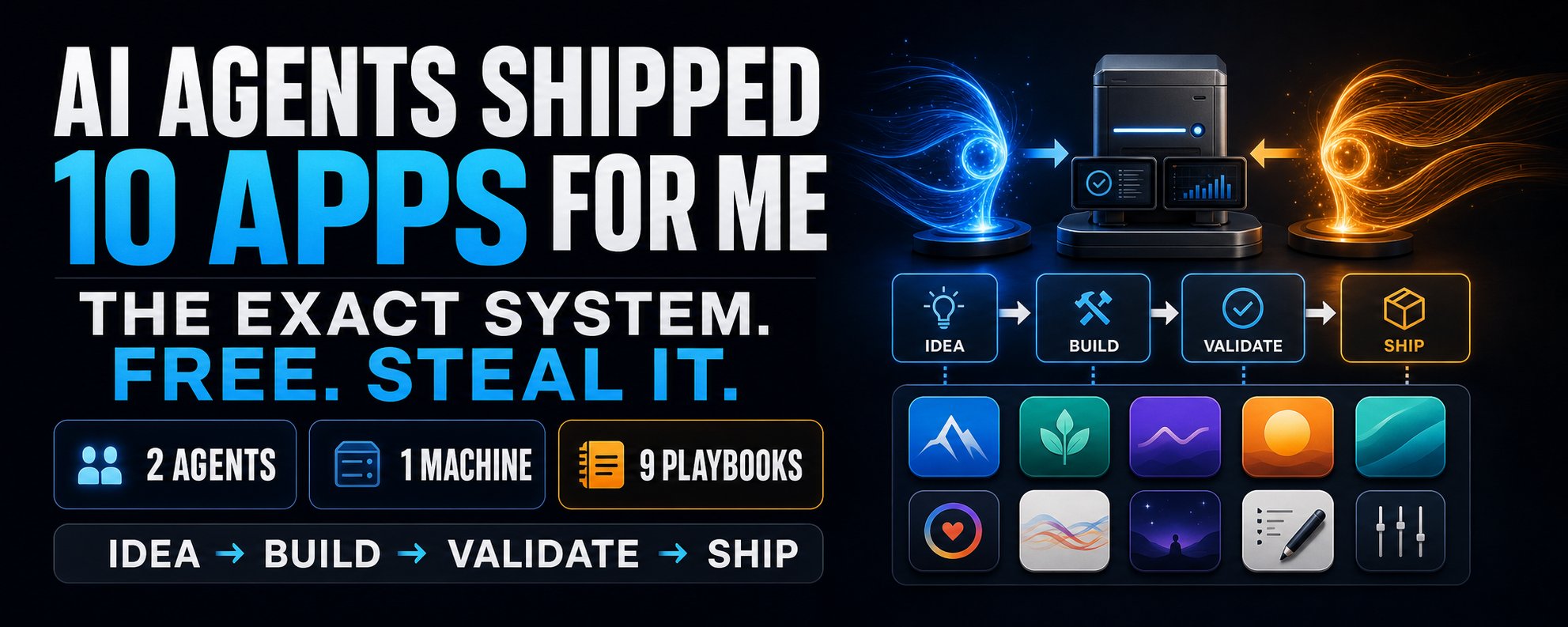
Proof points from the last 4 weeks:
- 94 commits in one day. My most productive day - I had 3 client calls and didn't open my editor once. The average is around 50 commits a day.
- 7 PRs in 30 minutes. Idea to production are blazing fast because coding and validations are mostly automated.
- Commits → MRR: I use this for a real B2B SaaS I'm building — bundling it with founder-led sales to deliver most feature requests same-day. Speed converts leads into paying customers.
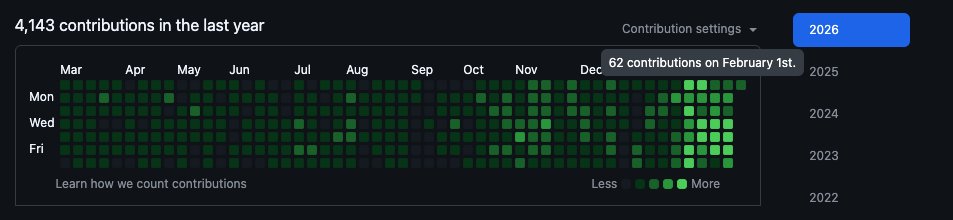
My git history looks like I just hired a dev team. In reality it's just me going from managing claude code, to managing an openclaw agent that manages a fleet of other claude code and codex agents.
Success rate: The system one-shots almost all small to medium tasks without any intervention.
Cost: ~$100/month for Claude and $90/month for Codex, but you can start with $20.
Here's why this works better than using Codex or Claude Code directly:
>Codex and Claude Code have very little context about your business.
They see code. They don't see the full picture of your business.
OpenClaw changes the equation. It acts as the orchestration layer between you and all agents — it holds all my business context (customer data, meeting notes, past decisions, what worked, what failed) inside my Obsidian vault, and translates historical context into precise prompts for each coding agent. The agents stay focused on code. The orchestrator stays at the high strategy level.
Here's how the system works at a high level:
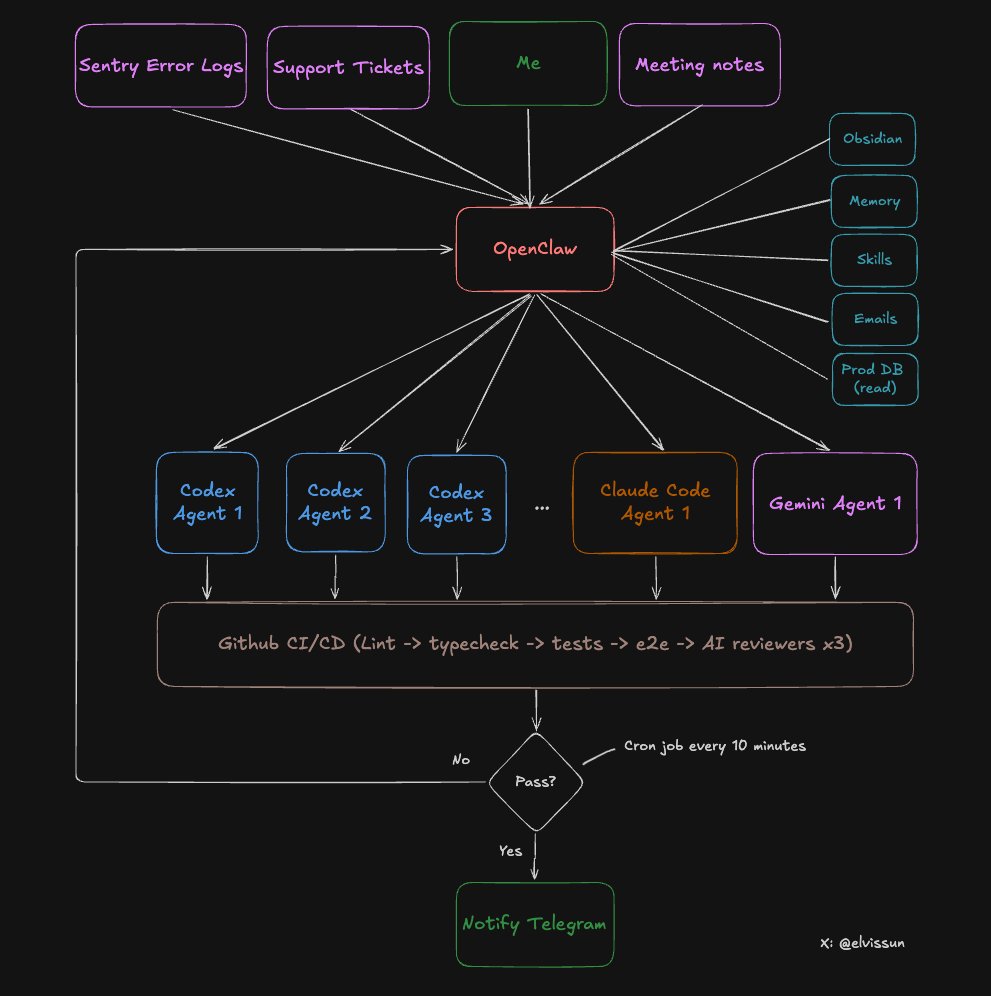
Last week Stripe wrote about their background agent system called "Minions" — parallel coding agents backed by a centralized orchestration layer. I accidentally built the same thing but it runs locally on my Mac mini.
Before I tell you how to set this up, you should know WHY you need an agent orchestrator.
Why One AI Can't Do Both
Context windows are zero-sum. You have to choose what goes in.
Fill it with code → no room for business context. Fill it with customer history → no room for the codebase. This is why the two-tier system works: each AI is loaded with exactly what it needs.
OpenClaw and Codex have drastically different context:
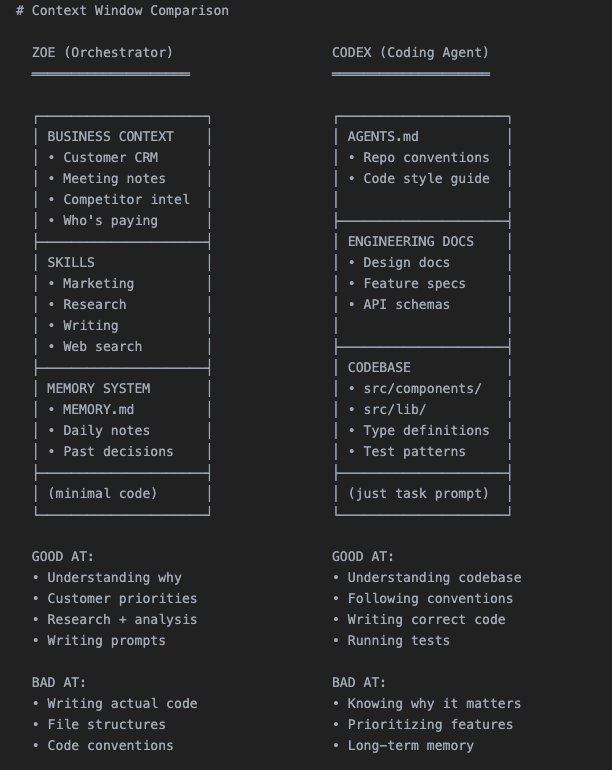
Specialization through context, not through different models.
The Full 8-step Workflow
Let me walk through a real example from last week.
Step 1: Customer Request → Scoping with Zoe
I had a call with an agency customer. They wanted to reuse configurations they've already set up across the team.
After the call, I talked through the request with Zoe. Because all my meeting notes sync automatically to my obsidian vault, zero explanation was needed on my end. We scoped out the feature together — and landed on a template system that lets them save and edit their existing configurations.
Then Zoe does three things:
- Tops up credits to unblock customer immediately — she has admin API access
- Pulls customer config from prod database — she has read-only prod DB access (my codex agents will never have this) to retrieve their existing setup, which gets included in the prompt
- Spawns a Codex agent — with a detailed prompt containing all the context
Step 2: Spawn the Agent
Each agent gets its own worktree (isolated branch) and tmux session:
1# Create worktree + spawn agent2git worktree add ../feat-custom-templates -b feat/custom-templates origin/main3cd ../feat-custom-templates && pnpm install45tmux new-session -d -s "codex-templates" \6 -c "/Users/elvis/Documents/GitHub/medialyst-worktrees/feat-custom-templates" \7 "$HOME/.codex-agent/run-agent.sh templates gpt-5.3-codex high"
The agent runs in a tmux session with full terminal logging via a script.
Here's how we launch agents:
1# Codex2codex --model gpt-5.3-codex \3 -c "model_reasoning_effort=high" \4 --dangerously-bypass-approvals-and-sandbox \5 "Your prompt here"67# Claude Code8claude --model claude-opus-4.5 \9 --dangerously-skip-permissions \10 -p "Your prompt here"
I used to use codex exec or claude -p, but switch to tmux recently:
tmux is far better because mid-task redirection is powerful. Agent going the wrong direction? Don't kill it:
1# Wrong approach:2tmux send-keys -t codex-templates "Stop. Focus on the API layer first, not the UI." Enter34# Needs more context:5tmux send-keys -t codex-templates "The schema is in src/types/template.ts. Use that." Enter
The task gets tracked in .clawdbot/active-tasks.json:
1{2 "id": "feat-custom-templates",3 "tmuxSession": "codex-templates",4 "agent": "codex",5 "description": "Plantillas de correo personalizadas para cliente agencia",6 "repo": "medialyst",7 "worktree": "feat-custom-templates",8 "branch": "feat/custom-templates",9 "startedAt": 1740268800000,10 "status": "running",11 "notifyOnComplete": true12}
When complete, it updates with PR number and checks. (More on this in step 5)
1{2 "status": "done",3 "pr": 341,4 "completedAt": 1740275400000,5 "checks": {6 "prCreated": true,7 "ciPassed": true,8 "claudeReviewPassed": true,9 "geminiReviewPassed": true10 },11 "note": "Todas las verificaciones pasadas. Listo para fusionar."12}
Step 3: Monitoring in a loop
A cron job runs every 10 minutes to babysit all agents. This pretty much functions as an improved Ralph Loop, more on it later.
But it doesn't poll the agents directly — that would be expensive. Instead, it runs a script that reads the JSON registry and checks:
1.clawdbot/check-agents.sh
The script is 100% deterministic and extremely token-efficient:
- Checks if tmux sessions are alive
- Checks for open PRs on tracked branches
- Checks CI status via gh cli
- Auto-respawns failed agents (max 3 attempts) if CI fails or critical review feedback
- Only alerts if something needs human attention
I'm not watching terminals. The system tells me when to look.
Step 4: Agent Creates PR
The agent commits, pushes, and opens a PR via \gh pr create --fill\. At this point I do NOT get notified — a PR alone isn't done.
Definition of done (very important your agent knows this):
- PR created
- Branch synced to main (no merge conflicts)
- CI passing (lint, types, unit tests, E2E)
- Codex review passed
- Claude Code review passed
- Gemini review passed
- Screenshots included (if UI changes)
Step 5: Automated Code Review
Every PR gets reviewed by three AI models. They catch different things:
- Codex Reviewer — Exceptional at edge cases. Does the most thorough review. Catches logic errors, missing error handling, race conditions. False positive rate is very low.
- Gemini Code Assist Reviewer — Free and incredibly useful. Catches security issues, scalability problems other agents miss. And suggests specific fixes. No brainer to install.
- Claude Code Reviewer — Mostly useless - tends to be overly cautious. Lots of "consider adding..." suggestions that are usually overengineering. I skip everything unless it's marked critical. It rarely finds critical issues on its own but validates what the other reviewers flag.
All three post comments directly on the PR.
Step 6: Automated Testing
Our CI pipeline runs a heavy amount of automated tests:
- Lint and TypeScript checks
- Unit tests
- E2E tests
- Playwright tests against a preview environment (identical to prod)
I added a new rule last week: if the PR changes any UI, it must include a screenshot in the PR description. Otherwise CI fails. This dramatically shortens review time — I can see exactly what changed without clicking through the preview.
Step 7: Human Review
Now I get the Telegram notification: "PR #341 ready for review."
By this point:
- CI passed
- Three AI reviewers approved the code
- Screenshots show the UI changes
- All edge cases are documented in review comments
My review takes 5-10 minutes. Many PRs I merge without reading the code — the screenshot shows me everything I need.
Step 8: Merge
PR merges. A daily cron job cleans up orphaned worktrees and task registry json.
The Ralph Loop V2
This is essentially the Ralph Loop, but better.
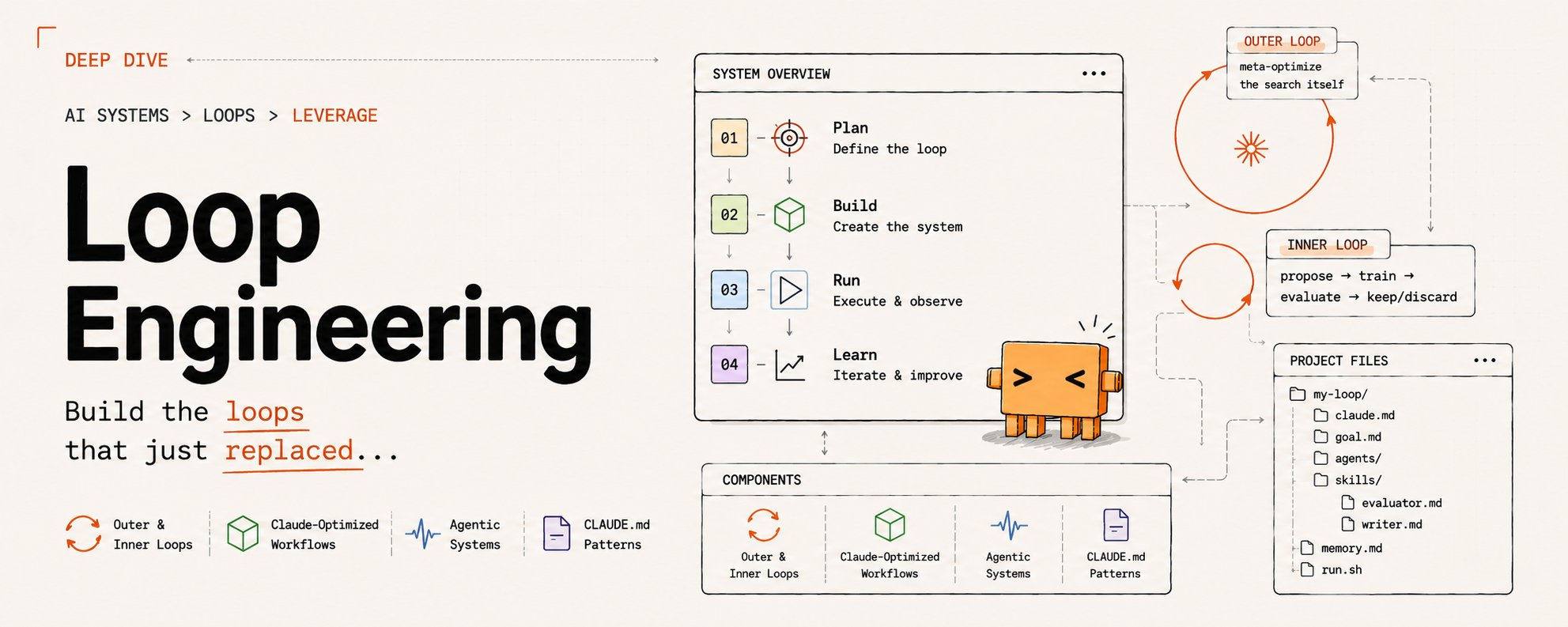
The Ralph Loop pulls context from memory, generate output, evaluate results, save learnings. But most implementations run the same prompt each cycle. The distilled learnings improve future retrievals, but the prompt itself stays static.
Our system is different. When an agent fails, Zoe doesn't just respawn it with the same prompt. She looks at the failure with full business context and figures out how to unblock it:
- Agent ran out of context? "Focus only on these three files."
- Agent went the wrong direction? "Stop. The customer wanted X, not Y. Here's what they said in the meeting."
- Agent need clarification? "Here's customer's email and what their company does."
Zoe babysits agents through to completion. She has context the agents don't — customer history, meeting notes, what we tried before, why it failed. She uses that context to write better prompts on each retry.
But she also doesn't wait for me to assign tasks. She finds work proactively:
- Morning: Scans Sentry → finds 4 new errors → spawns 4 agents to investigate and fix
- After meetings: Scans meeting notes → flags 3 feature requests customers mentioned → spawns 3 Codex agents
- Evening: Scans git log → spawns Claude Code to update changelog and customer docs
I take a walk after a customer call. Come back to Telegram: "7 PRs ready for review. 3 features, 4 bug fixes."
When agents succeed, the pattern gets logged. "This prompt structure works for billing features." "Codex needs the type definitions upfront." "Always include the test file paths."
The reward signals are: CI passing, all three code reviews passing, human merge. Any failure triggers the loop. Over time, Zoe writes better prompts because she remembers what shipped.
Choosing the Right Agent
Not all coding agents are equal. Quick reference:
Codex is my workhorse. Backend logic, complex bugs, multi-file refactors, anything that requires reasoning across the codebase. It's slower but thorough. I use it for 90% of tasks.
Claude Code is faster and better at frontend work. It also has fewer permission issues, so it's great for git operations. (I used to use this more to drive day to day, but Codex 5.3 is simply better and faster now)
Gemini has a different superpower — design sensibility. For beautiful UIs, I'll have Gemini generate an HTML/CSS spec first, then hand that to Claude Code to implement in our component system. Gemini designs, Claude builds.
Zoe picks the right agent for each task and routes outputs between them. A billing system bug goes to Codex. A button style fix goes to Claude Code. A new dashboard design starts with Gemini.
How to Set This Up
Copy this entire article into OpenClaw and tell it: "Implement this agent swarm setup for my codebase."
It'll read the architecture, create the scripts, set up the directory structure, and configure cron monitoring. Done in 10 minutes.
No course to sell you.
The Bottleneck Nobody Expects
Here's the ceiling I'm hitting right now: RAM.
Each agent needs its own worktree. Each worktree needs its own
ode_modules\. Each agent runs builds, type checks, tests. Five agents running simultaneously means five parallel TypeScript compilers, five test runners, five sets of dependencies loaded into memory.
My Mac Mini with 16GB tops out at 4-5 agents before it starts swapping — and I need to be lucky they don't try to build at the same time.
So I bought a Mac Studio M4 max with 128GB RAM ($3,500) to power this system. It arrives end of March and I'll share if it's worth it.
Up Next: The One-Person Million-Dollar Company
We're going to see a ton of one-person million-dollar companies starting in 2026. The leverage is massive for those who understand how to build recursively self-improving agents.
This is what it looks like: an AI orchestrator as an extension of yourself (like what Zoe is to me), delegating work to specialized agents that handle different business functions. Engineering. Customer support. Ops. Marketing. Each agent focused on what it's good at. You maintain laser focus and full control.
The next generation of entrepreneurs won't hire a team of 10 to do what one person with the right system can do. They'll build like this — staying small, moving fast, shipping daily.
There's so much AI-generated slop right now. So much hype around agents and "mission controls" without building anything actually useful. Fancy demos with no real-world benefits.
I'm trying to do the opposite: less hype, more documentation of building an actual business. Real customers, real revenue, real commits that ship to production, and real loss too.
What am I building? Agentic PR — a one-person company taking on the enterprise PR incumbents. Agents that help startups get press coverage without a $10k/month retainer.
If you want to see how far I take this, follow along.