Photoreal Character Design Sheet
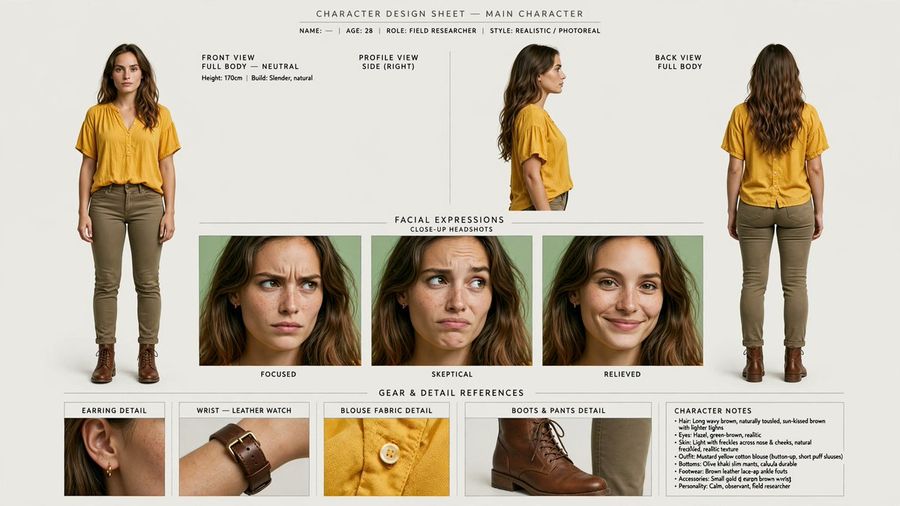
Creates a production-ready photoreal character sheet from a portrait reference with consistent multi-view poses, expressions, gear details, and notes.

Промпт
Using REFERENCE_0 as the identity base, turn the portrait into a clean photorealistic character design sheet for main character. Preserve the woman’s facial identity, freckles, hair, yellow blouse, and realistic photo look, but expand her into full-body reference poses and production details. Canvas and style: Wide horizontal character sheet on an off-white studio background, minimal editorial layout, thin divider lines, small uppercase technical labels, realistic lighting, high-resolution photoreal consistency across every panel. Top header: Add the title “CHARACTER DESIGN SHEET — MAIN CHARACTER” and a small metadata line: “NAME: — | AGE: 28 | ROLE: FIELD RESEARCHER | STYLE: REALISTIC / PHOTOREAL”. Main body layout: Create exactly 3 character view panels across the top: 1) front view, full body, neutral stance; 2) right-side profile view; 3) back view, full body. For the newly visible full-body styling, add olive/khaki slim pants and brown leather lace-up boots while keeping the blouse consistent with the reference. Expression section: Add a centered section titled “FACIAL EXPRESSIONS” with subtitle “CLOSE-UP HEADSHOTS”. Include exactly 3 close-up expression panels labeled: “FOCUSED”, “SKEPTICAL”, and “RELIEVED”. Keep the same character identity in all three. Gear and detail section: Add a lower section titled “GEAR & DETAIL REFERENCES”. Include exactly 4 detail panels labeled: 1) “EARRING DETAIL” showing a small gold hoop earring, 2) “WRIST — LEATHER WATCH” showing a brown leather wristwatch, 3) “BLOUSE FABRIC DETAIL” showing the yellow blouse texture and button, 4) “BOOTS & PANTS DETAIL” showing the brown boot and olive pant cuff. Character notes: Add a compact notes box on the lower right titled “CHARACTER NOTES” with short bullet points summarizing hair, eyes, skin, outfit, bottoms, footwear, accessories, and personality. Use the personality line: Calm, observant, field researcher. Constraints: Keep all views and headshots visually consistent with REFERENCE_0, avoid changing the face into a different person, do not add extra panels beyond the 3 views, 3 expressions, 4 detail references, and 1 notes box, and keep all text clean and legible.

Референсные изображения

Как использовать этот промпт

  1. 1

    Скопируйте полный промпт выше.

  2. 2

    Откройте платформу, поддерживающую GPT Image 2, например YouMind, и вставьте промпт.

  3. 3

    Замените объект, стиль или детали в соответствии с вашей идеей, а затем создавайте.

Это бесплатный AI-промпт из библиотеки YouMind. Изучите тысячи других промптов изображение, которые можно бесплатно копировать и адаптировать.

Изучить больше промптов изображение
Другие функции промптов

Библиотека AI

Поиск AI-промптов

Позвольте AI искать среди десятков тысяч промптов. Фильтруйте по модели, временному диапазону, ключевым словам и сортируйте по вовлеченности — просмотрам, закладкам, репостам и многому другому.

Инструменты зрения

Изображение в промпт

Превратите любую фотографию в подробный AI-промпт для изображения. Бесплатный конвертер изображений в промпты анализирует композицию, стиль и освещение, чтобы вы могли воссоздать любой образ за секунды.

Создано для творцов. Бесплатно навсегда.

YouMind — это ИИ-копилот для творчества, которому доверяют миллионы создателей по всему миру. Каждый промпт здесь отобран так, чтобы помочь вам творить лучше и быстрее.

Изучить другие промпты