A comprehensive prompt for creating structured educational or training manga with consistent character designs and professional panel layouts.
Промпт
Common Character Settings + Drawing Rules: Strictly adhere to the character designs of the two protagonists.
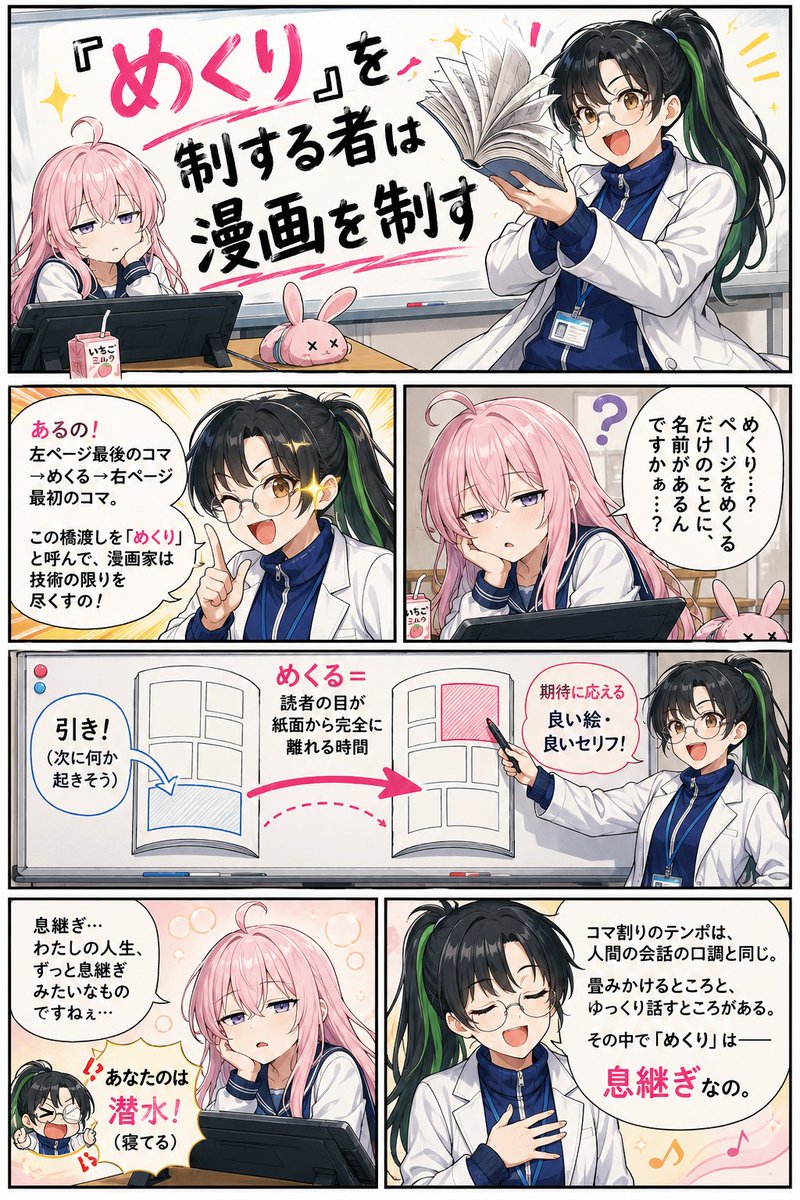
Teacher (Midori-sensei): Black straight hair in a ponytail with a single thin green highlight. Wears glasses. Wearing a large, ill-fitting white lab coat over baggy gym clothes. Expressive, energetic, and mischievous but proud of being a teacher. Uses large gestures and speaks passionately with hand movements.
Student (Pink-chan): Pale pink hair, slouched posture, with a single cowlick on top of her head. Always looks sleepy with half-closed eyes. Has a laid-back vibe and slow movements. On her desk are a drawing tablet (often used as a pillow), a half-finished strawberry milk, and a rabbit plushie pen case.
Style/Finish Specs: Generate in full color (no monochrome or grayscale). Saturation should be bright like a comedy manga; ensure Midori-sensei's green highlight and Pink-chan's pale pink hair are clearly colored.
Do not display any panel numbers (1, 2, 3, etc.) inside the panels. Labels like 'Panel 1' below are for instruction only. Adhere strictly to the Japanese commercial manga reading order (right-to-left, top-to-bottom starting from top-right). Speech bubble placement should not obstruct this flow. Thick black panel borders. Large, readable Japanese text. Setting is a manga classroom with a whiteboard, desks, and drawing tablets.
[Page 1] Vertical (3:4), 6 panels arranged R-to-L, Top-to-Bottom:
Panel 1: Title panel. Large handwritten-style text: "Master the Page-Turn, Master the Manga". Midori-sensei holds a book and exaggeratedly demonstrates turning a page. Pink-chan is leaning on her hand, half-asleep.
Panel 2: Pink-chan asks lazily: 'Page-turn...? Does just turning a page really have a name...?' with a '?' above her head.
Panel 3: Midori-sensei's glasses glint. 'Yes! From the last panel on the left page to the first on the right. This bridge is called the "page-turn," and manga artists use every bit of their skill on it!' Background has focus lines.
Panel 4: Diagram panel. A schematic on a whiteboard showing a book spread: labels for 'Hook' on the bottom-left, 'Turn = time eyes leave the paper' in the middle, and 'Rewarding image/line' on the top-right. Midori-sensei points to it with a marker.
Panel 5: Metaphor panel. Midori-sensei speaks with her hand on her heart. 'Panel pacing is like human speech. There are fast parts and slow parts. Within that, the page-turn is—a breath.' Musical rest motifs in background.
Panel 6: Pink-chan mutters: 'A breath... my whole life is like one long breath...' Midori-sensei's small bubble: 'Yours is a deep dive! (You're sleeping!)'.
[Page 2] Vertical (3:4), 7 panels:
Panel 1: Midori-sensei continues. 'Reader focus breaks during the turn. So the last panel on the left must be a "hook" or a natural scene change!' Small example illustration on the side.
Panel 2: 'Then the first panel on the right. Because of the gap, reader expectations are up. You need a great line or image. It's the "build-up" before a big scene!' Example showing a double-page spread feel.
Panel 3: Midori-sensei starts a demo, placing a book in front of Pink-chan excitedly. 'Try it! Look at this last panel... makes you want to turn it, right?'
Panel 4: Pink-chan leans in, eyes slightly wider, reaching for the page. 'Oh... true... I'm curious... about what's next...' A tiny highlight in her eye.
Panel 5: Peak of passion. Midori-sensei's coat flutters. 'Exactly!! When that curiosity stacks, you get a work where the reader can't stop turning pages! It's a gift to the reader!!' Warm heat-tone background.
Panel 6: Pink-chan is face-down on the open book, fast asleep using it as a pillow. 'Zzz...' The page is slightly folded under her cheek.
Panel 7: Midori-sensei collapses. 'Every day!! And using the book as a pillow!!' Small bubble: '...I guess the page-turning stopped.'
Как использовать этот промпт
1
Скопируйте полный промпт выше.
2
Откройте платформу, поддерживающую GPT Image 2, например YouMind, и вставьте промпт.
3
Замените объект, стиль или детали в соответствии с вашей идеей, а затем создавайте.
Это бесплатный AI-промпт из библиотеки YouMind. Изучите тысячи других промптов изображение, которые можно бесплатно копировать и адаптировать.
Позвольте AI искать среди десятков тысяч промптов. Фильтруйте по модели, временному диапазону, ключевым словам и сортируйте по вовлеченности — просмотрам, закладкам, репостам и многому другому.
Превратите любую фотографию в подробный AI-промпт для изображения. Бесплатный конвертер изображений в промпты анализирует композицию, стиль и освещение, чтобы вы могли воссоздать любой образ за секунды.
YouMind — это ИИ-копилот для творчества, которому доверяют миллионы создателей по всему миру. Каждый промпт здесь отобран так, чтобы помочь вам творить лучше и быстрее.