Dark Chat Anime Generation Screenshot
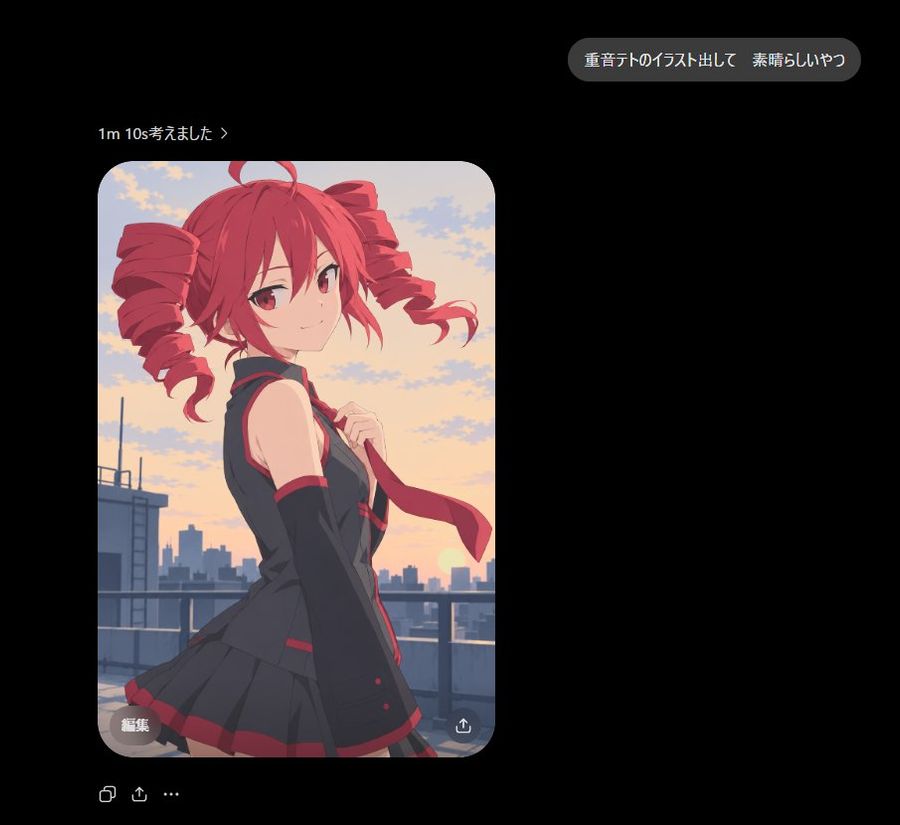
Creates a dark-mode AI chat screenshot featuring a generated anime illustration card of a red-haired character on a sunset rooftop.

Промпт
Goal: Create a dark-mode chat/app screenshot showing an AI image generation result for Astra, with a polished anime illustration embedded in the conversation. Canvas: Square 1:1 screenshot, approximately 920×920 px, black background, lots of negative space on the right and lower areas. Use a realistic mobile/desktop chat UI aesthetic with clean spacing and soft rounded elements. Layout: Place 3 main UI elements: 1 rounded gray user message bubble near the upper right, 1 small generation status line above the image on the left, and 1 large rounded-corner image card below it on the left. Under the image card, add 3 small action icons in a row: copy icon, share/upload icon, and ellipsis menu. Inside the image card add 2 small overlay controls: a gray rounded “edit” pill at bottom left and a circular download/share icon at bottom right. Text content: The user bubble must read exactly 「重音テトのイラスト出して 素晴らしいやつ」. The status line must read exactly 「1m 10s考えました ›」. The image overlay button must read exactly 「編集」. Keep all text crisp, white or light gray, in a modern sans-serif UI font. Image card subject: A high-quality clean anime illustration of Kasane Teto, shown from about mid-thigh up on a rooftop at sunset. She is a youthful anime girl with vivid red hair in two large drill twin-tails, red eyes, a small confident smile, and a slight over-the-shoulder pose looking at the viewer. Outfit: black sleeveless school-idol style top with red trim, matching black pleated skirt with red accents, long black arm warmers, and a red necktie being held lightly in one hand. The wind lifts her tie and hair ribbons slightly. Background inside image: Rooftop railing in the foreground, distant city skyline silhouettes, warm orange-pink sunset sky with scattered soft clouds and the sun low near the horizon. Lighting is soft and cinematic with smooth cel-shaded anime rendering, clean linework, subtle gradients, no gritty artifacts, no harsh malformed highlights, and no painterly blotches. Visual style: The surrounding chat UI should look like a real screenshot in dark mode. The anime image should have rounded corners, about 400 px wide and 600 px tall, placed around x=98 y=162, with a 28 px corner radius. Keep the UI minimal and do not add extra messages, watermarks, timestamps, or labels beyond the specified text.

Как использовать этот промпт

  1. 1

    Скопируйте полный промпт выше.

  2. 2

    Откройте платформу, поддерживающую GPT Image 2, например YouMind, и вставьте промпт.

  3. 3

    Замените объект, стиль или детали в соответствии с вашей идеей, а затем создавайте.

Это бесплатный AI-промпт из библиотеки YouMind. Изучите тысячи других промптов изображение, которые можно бесплатно копировать и адаптировать.

Изучить больше промптов изображение

Другие функции промптов

Библиотека AI

Поиск AI-промптов

Позвольте AI искать среди десятков тысяч промптов. Фильтруйте по модели, временному диапазону, ключевым словам и сортируйте по вовлеченности — просмотрам, закладкам, репостам и многому другому.

Инструменты зрения

Изображение в промпт

Превратите любую фотографию в подробный AI-промпт для изображения. Бесплатный конвертер изображений в промпты анализирует композицию, стиль и освещение, чтобы вы могли воссоздать любой образ за секунды.

Создано для творцов. Бесплатно навсегда.

YouMind — это ИИ-копилот для творчества, которому доверяют миллионы создателей по всему миру. Каждый промпт здесь отобран так, чтобы помочь вам творить лучше и быстрее.

Изучить другие промпты