Photorealistic Studio Portrait of a Man
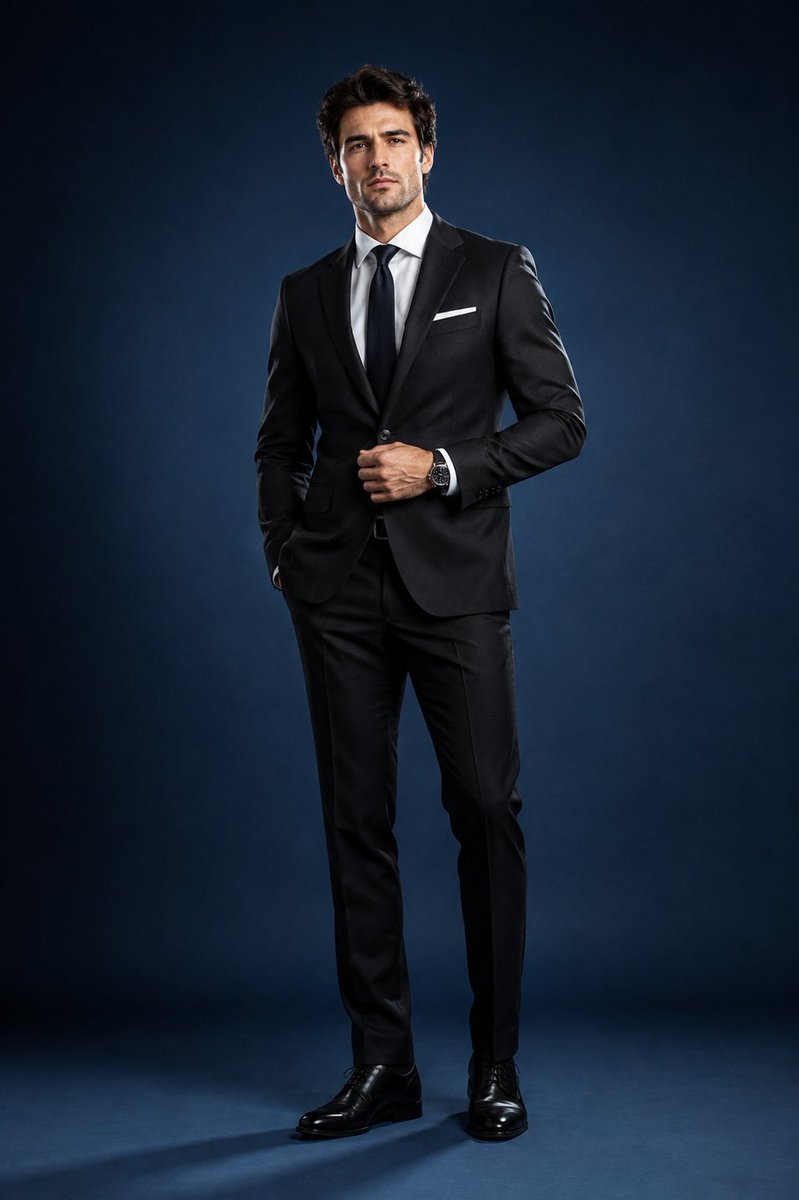
A highly detailed prompt for a high-end studio portrait of a European man in a suit, focusing on lighting and realistic textures.
프롬프트
Create an ultra-photorealistic, high-end studio portrait of a handsome European man in sophisticated formal attire. He has refined masculine features, fair-to-light natural skin, neatly styled dark-brown hair, subtle well-groomed stubble, and a confident yet relaxed expression.\n\nDress him in a perfectly tailored charcoal-black suit with a crisp white dress shirt, elegant black tie, matching tailored trousers, polished black leather dress shoes, and minimal classic accessories, including a refined wristwatch.\n\nPlace him in a premium professional photography studio with a clean, seamless deep-blue background. Use controlled, minimalist lighting focused almost entirely on the subject: a soft key light on his face and upper body, an extremely subtle rim light separating his silhouette from the background, and gentle, natural-looking shadows. Keep the background dark and understated so the man remains the sole visual focus.\n\nPose him naturally with confident editorial body language—standing upright with relaxed shoulders, one hand lightly adjusting his jacket and the other resting naturally at his side.\n\nPrioritize authentic realism: detailed skin texture, subtle facial imperfections, individual hair strands, sharp natural eyes, realistic fabric texture, precise suit tailoring, accurate proportions, and believable shadows.\n\nStyle: luxury fashion editorial, sophisticated corporate portrait, cinematic depth, shallow depth of field, premium professional photography, 85mm portrait lens, f/2.0, soft bokeh, crisp facial detail, subtle film grain, balanced contrast, ultra-photorealistic, 8K quality.\n\nAvoid: distracting props, text, logos, excessive lighting, artificial skin, exaggerated retouching, distorted anatomy, unrealistic proportions, or anything that takes attention away from the subject.
이 프롬프트 사용법
- 1
위의 전체 프롬프트를 복사하세요.
- 2
GPT Image 2을 지원하는 플랫폼(예: YouMind)을 열고 프롬프트를 붙여넣으세요.
- 3
원하는 아이디어에 맞게 주제, 스타일, 세부 정보를 바꾼 뒤 생성하세요.
이것은 YouMind 프롬프트 라이브러리의 무료 AI 프롬프트입니다. 복사하고 변형해 쓸 수 있는 수천 개의 이미지 프롬프트가 더 있습니다.
더 많은 이미지 프롬프트 보기
더 많은 프롬프트 기능

AI 라이브러리
AI 프롬프트 검색
AI가 수만 개의 프롬프트를 검색해줍니다. 모델·기간·키워드로 필터링하고 노출, 북마크, 리포스트 등 인기 지표로 정렬할 수 있어요.
비전 도구
이미지를 프롬프트로
어떤 사진이든 상세한 AI 이미지 프롬프트로 변환하세요. 무료 Image to Prompt 변환기가 구도, 스타일, 조명을 분석해 몇 초 만에 같은 느낌을 재현할 수 있습니다.
크리에이터를 위해, 영원히 무료.
YouMind는 전 세계 크리에이터가 신뢰하는 AI 창작 파트너입니다. 이곳의 모든 프롬프트는 더 빠르고 더 나은 창작을 돕기 위해 엄선되었습니다.