3 패널 AI 빌보드 비교
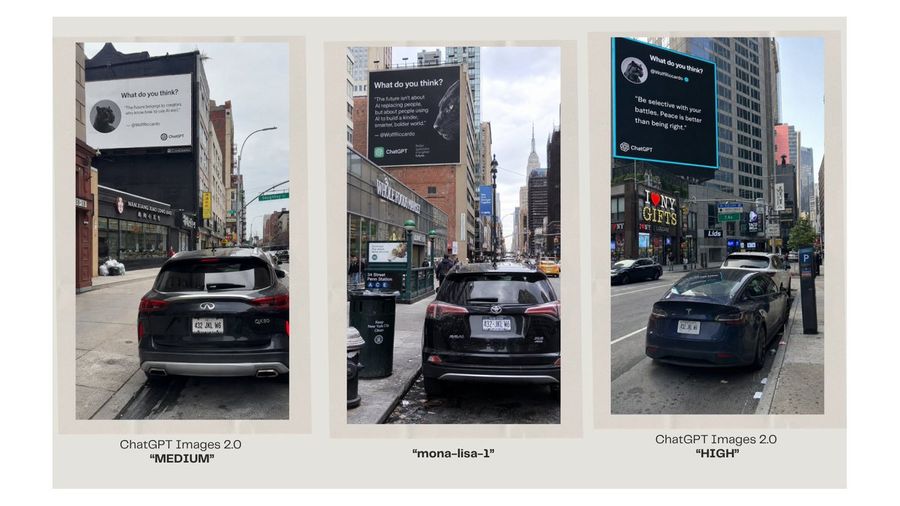
서로 다른 이미지 모델의 출력물을 비교하는 듯한, 3개의 사실적인 뉴욕 거리 빌보드 장면을 보여주는 와이드 비교 슬라이드입니다.
프롬프트
목표: AI로 생성된 3개의 도시 빌보드 사진을 나란히 배치하여 이미지 모델의 출력물을 비교하는 깔끔한 비교 그래픽을 제작합니다.
캔버스: 따뜻한 오프 화이트 배경과 여유 있는 여백을 갖춘 16:9 와이드 프레젠테이션 슬라이드입니다. 캔버스 전체에 걸쳐 3개의 긴 수직 사진 패널을 균일한 간격으로 배치하고, 각 패널은 연한 베이지색 매트/테두리로 감쌉니다. 각 패널 아래에는 중앙 정렬된 캡션을 추가합니다.
레이아웃: 한 줄에 3개의 수직 거리 사진 패널을 배치합니다. 왼쪽에는 패널 1, 중앙에는 패널 2, 오른쪽에는 패널 3을 배치합니다. 각 패널은 전경에 주차된 자동차, 높은 건물, 보도, 교통 표지판, 그리고 건물 높이 설치된 대형 사각형 빌보드가 포함된 사실적인 뉴욕 거리 장면을 보여줍니다. 동일한 콘셉트에 대한 3개의 개별 모델 출력물처럼 각 패널마다 거리 각도와 조명을 약간씩 다르게 설정합니다.
패널 세부 정보: 왼쪽 패널: 상점과 건물을 바라보는 도시 거리에 주차된 검은색 SUV의 후면 모습; 거리 위 대형 흰색 빌보드에는 작은 원형 동물 아바타와 함께 “What do you think?”라는 제목, 짧은 인용구, 작은 ChatGPT 브랜딩이 표시됩니다. 중앙 패널: 맨해튼의 좁은 거리에 주차된 검은색 SUV와 멀리 보이는 엠파이어 스테이트 빌딩; 흰색 텍스트, 원형 동물 아바타, ChatGPT 브랜딩이 있는 대형 어두운 빌보드. 오른쪽 패널: “I ♥ NY GIFTS”와 같은 상점 간판이 있는 번화가에 주차된 검은색 세단; 밝은 청록색 테두리, 흰색 인용 텍스트, 원형 동물 아바타, ChatGPT 브랜딩이 있는 대형 검은색 빌보드.
캡션 텍스트: 패널 아래에 정확히 3개의 캡션을 사용합니다. 왼쪽 캡션: 첫 번째 줄에 “ChatGPT Images 2.0”, 두 번째 줄에 굵은 따옴표로 “MEDIUM”을 표기합니다. 중앙 캡션: 굵은 따옴표로 “mona-lisa-1”을 표기합니다. 오른쪽 캡션: 첫 번째 줄에 “ChatGPT Images 2.0”, 두 번째 줄에 굵은 따옴표로 “HIGH”를 표기합니다.
사용자 지정 텍스트 슬롯: 비교 라벨은 ChatGPT Images 2.0, mona-lisa-1, ChatGPT Images 2.0으로 표시되어야 합니다. 왼쪽 품질 태그는 MEDIUM, 오른쪽 품질 태그는 HIGH여야 합니다.
시각적 스타일: 각 패널 내부는 사실적인 스마트폰 거리 사진 느낌을 주되, 세련된 소셜 미디어 비교 슬라이드 형식으로 구성합니다. 3개의 액자형 이미지와 캡션 외에는 장식적인 그래픽을 배제하여 슬라이드를 전체적으로 미니멀하게 유지합니다. 사진 속 빌보드 텍스트는 작고 다소 불완전할 수 있지만, ChatGPT 로고가 포함된 AI 인용 카드 광고임을 명확히 알 수 있어야 합니다.
이 프롬프트 사용법
- 1
위의 전체 프롬프트를 복사하세요.
- 2
GPT Image 2을 지원하는 플랫폼(예: YouMind)을 열고 프롬프트를 붙여넣으세요.
- 3
원하는 아이디어에 맞게 주제, 스타일, 세부 정보를 바꾼 뒤 생성하세요.
이것은 YouMind 프롬프트 라이브러리의 무료 AI 프롬프트입니다. 복사하고 변형해 쓸 수 있는 수천 개의 이미지 프롬프트가 더 있습니다.
더 많은 이미지 프롬프트 보기
더 많은 프롬프트 기능

AI 라이브러리
AI 프롬프트 검색
AI가 수만 개의 프롬프트를 검색해줍니다. 모델·기간·키워드로 필터링하고 노출, 북마크, 리포스트 등 인기 지표로 정렬할 수 있어요.
비전 도구
이미지를 프롬프트로
어떤 사진이든 상세한 AI 이미지 프롬프트로 변환하세요. 무료 Image to Prompt 변환기가 구도, 스타일, 조명을 분석해 몇 초 만에 같은 느낌을 재현할 수 있습니다.
크리에이터를 위해, 영원히 무료.
YouMind는 전 세계 크리에이터가 신뢰하는 AI 창작 파트너입니다. 이곳의 모든 프롬프트는 더 빠르고 더 나은 창작을 돕기 위해 엄선되었습니다.